Want to know what ads your competitors are running right now? You can, for free.
It’s called the Meta Ad Library, and if you’re in marketing, it’s not optional. That’s where you see exactly what brands are putting money behind across Facebook and Instagram. Creative, copy, targeting details, timing. All of it. Right there.
And with 3.43 billion people scrolling Meta’s platforms every day, it’s where the real ad action happens.
So why fly blind? In this guide, we’ll walk you through how to use the Meta Ad Library like a pro in 2026.
Let’s get practical.
What is Meta Ad Library?
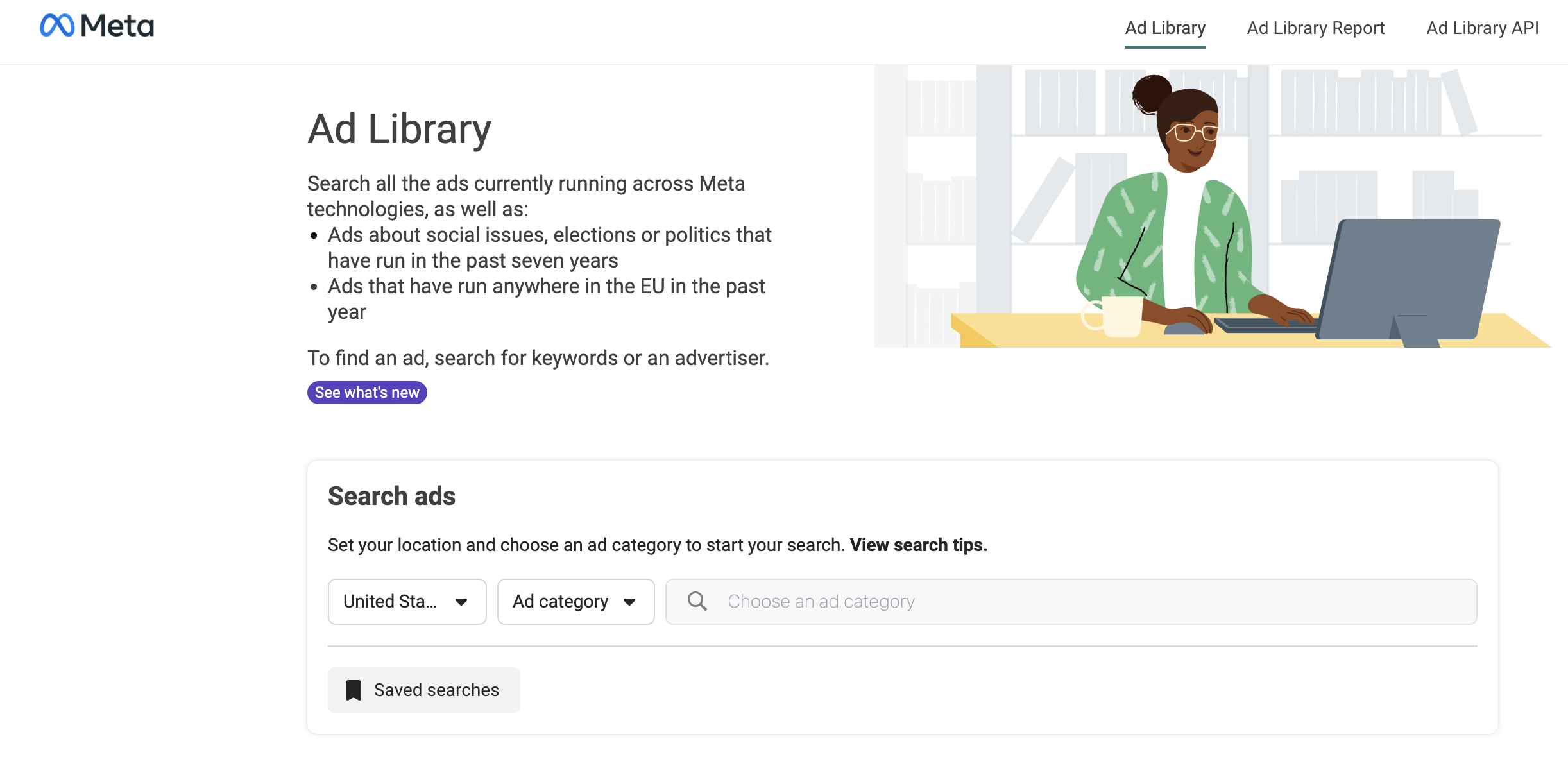
Let’s keep it simple: the Meta Ad Library is where you see what’s actually running across Facebook and Instagram. That includes ads, creatives, copy, spend insights, targeting ranges, and more.
Meta launched it in 2018 to bring more transparency to political ads. But today? It’s one of the most powerful public-facing ad libraries out there, used by marketers, researchers, journalists, and yes, your competitors.
And with 69.6% of marketers running Facebook ads and 70% using Instagram as part of their strategy, you can bet that what’s in the Library isn’t just noise. It’s the stuff brands are betting on.
You can search by keyword, advertiser, region, platform, or ad category. Each ad shows you whether it’s active or inactive, when it started running, how many versions it has, which platforms it’s showing on, or if it’s marked as a paid partnership.
It’s not perfect (we’ll get to that later). But it’s the closest thing you’ll get to a front-row seat into how other brands are spending.
How to Access and Navigate the Meta Ad Library: A Guide for Beginners
Accessing the Meta Ad Library is as simple as finding a really good meme on the internet.
Here’s how you do it:
- Open your web browser and type in: “Meta Ad Library,” or you can also just directly visit the Meta Ad Library. You’ll see the search bar and filtering options. Navigate to the brand’s Facebook page to find insights about the ads they run.
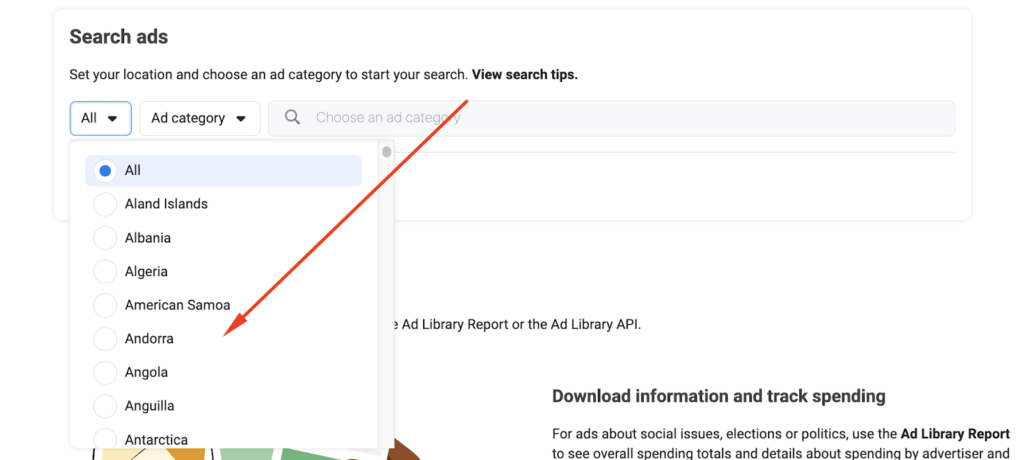
- Click on the country selector drop-down menu. You can either choose your current location or search for a specific country (or choose ‘All’). This allows you to see ads specific to that region.
- Click on the ‘Ad category’ drop-down menu. Select the category that matches your interest: All ads, Issues, elections or politics, Housing, Employment, or Credit.
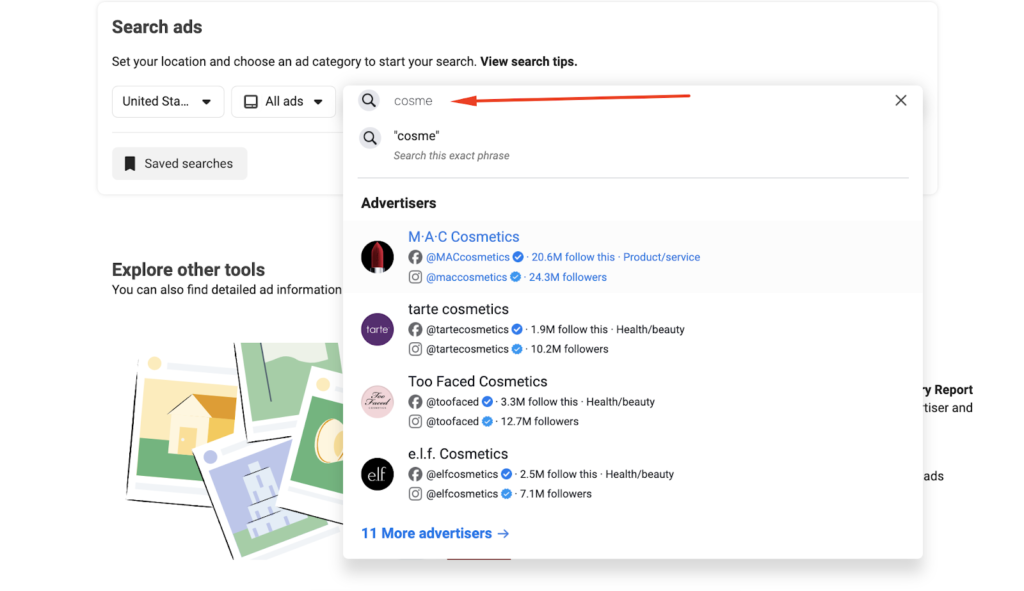
- In the search bar, type in keywords or the name of the advertiser you are interested in. The search will return a list of advertisers matching your query.
💡 Pro Tip: Looking for ads from a specific location? Type city or country names in the keyword box. It’s a perfect solution for local businesses or regional targeting.
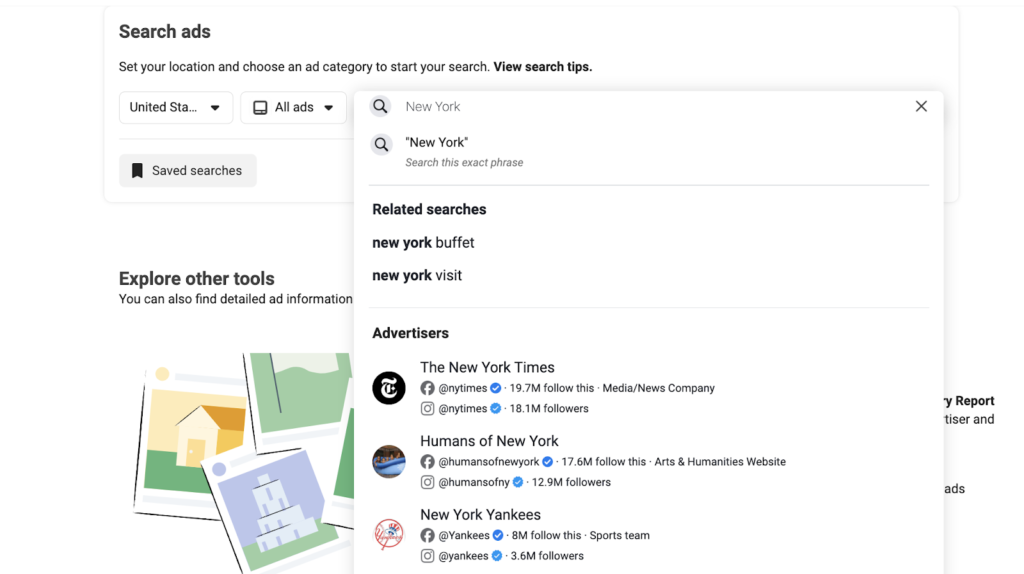
📝 Exact phrase search: Enclose your search terms in quotes to find ads containing that exact phrase. This saves you from wading through irrelevant ads.
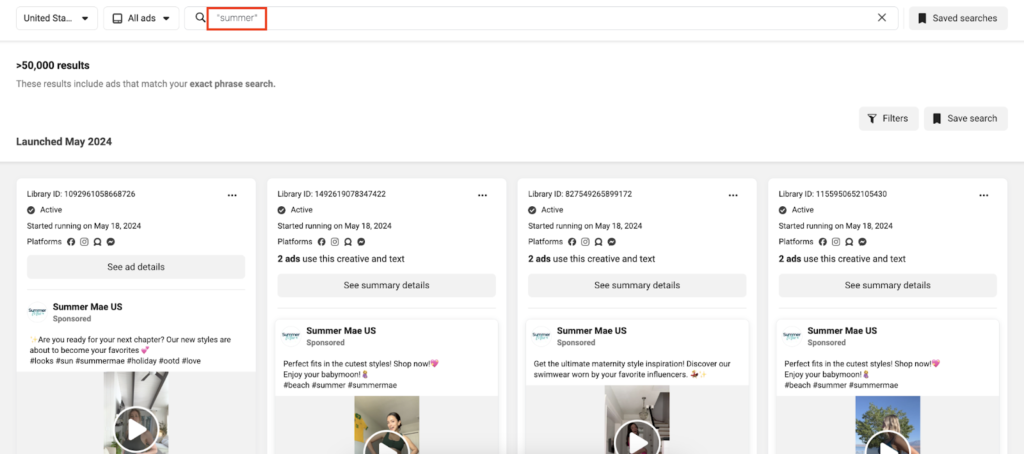
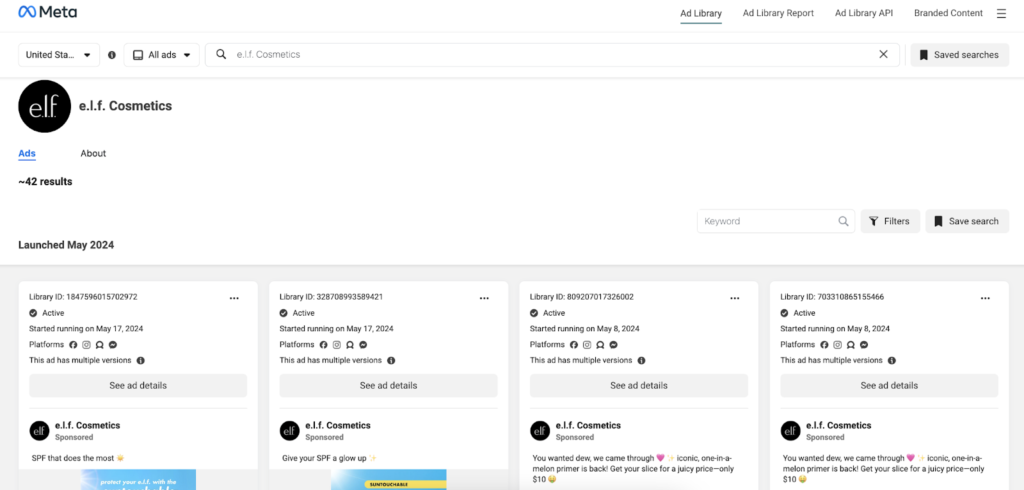
- Click on the advertiser’s name from the search results to see all their active and inactive ads. Each ad will have details like the ad ID, status, platforms, and start date.
- To narrow down the search results, click on the ‘Filters’ button.
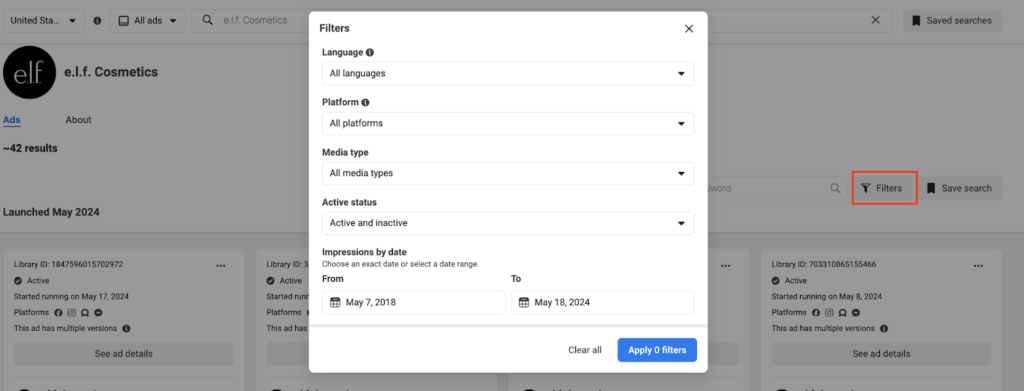
You can filter ads by language, platform (Facebook, Instagram, Audience Network, Messenger), media type (images, videos, memes), active status (active or inactive), and impressions by date.
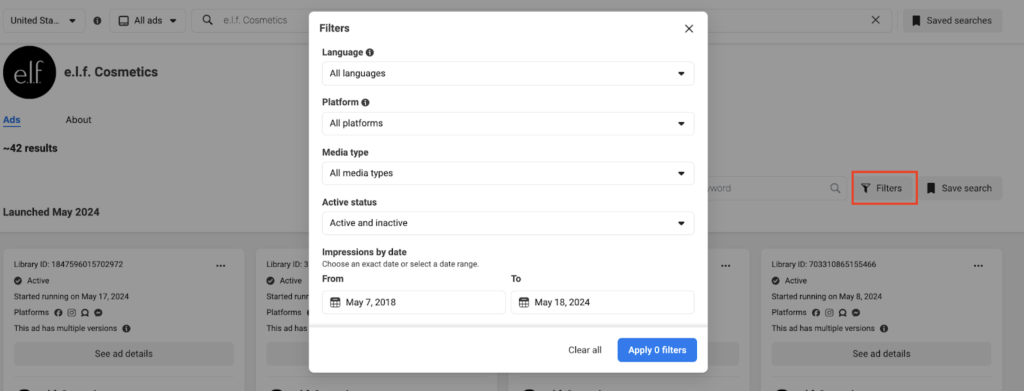
💡 Pro Tip: This feature (Sorting by Date) can help identify seasonal trends and understand the timing of your competitors’ campaigns.
Features of the Meta Ad Library
The Meta or Facebook Ad Library is packed with features that make it a marketer’s best friend, and it’s here to help you navigate the ad jungle like a pro.
Let’s break down its key features and see how they can transform your advertising game:
Basic Features
1. Search and Filter Options
Users can search for ads by advertiser name, keywords, and other criteria to see both active and inactive campaigns:
- Keyword search: Just like you do on Google, type in any one specific keyword related to your sector, competitor, or even niche markets. The Ad Library will fetch you all relevant inactive and active ads.
- Exact phrase search: Once in a while, the necessity for precision is felt. That’s when Exact Phrase Search will be your best friend. Just scrunch your search query up in quotes, and the ads that come up will have that exact phrase you want to look at.
- Filtering by media type: Want to see only video ads or just memes? No problem. The filtering system allows you to sort through ads by their media type, be it images, videos, memes, or a mix. This is incredibly useful when you need specific creative inspiration.
- Active status: Active status can be filtered so one may sort ads currently running or those that ran before. This can give you ideas about active campaigns and strategies that might be working really well right now.
- Date range: Want to analyze ads from the last holiday season or a specific promotional period? Finally, you are able to use the date range filter to drill down and see exactly when an ad was running so you can spot those vital seasonal trends and timing strategies.
- Location filters: No matter if your ads are targeted to New York, Paris, or Timbuktu, the location filter will assist in fine-tuning ads for a given place.
- Language filters: Advertising in multiple languages can be a headache, but with the language filter, it’s a breeze. View ads in your preferred language, or analyze the crafting of ads for non-English-speaking audiences.
2. Ad Details
It provides information about individual ads, including the creative content, the campaign’s duration, and basic data about the advertiser.
3. Multi-Platform Viewing
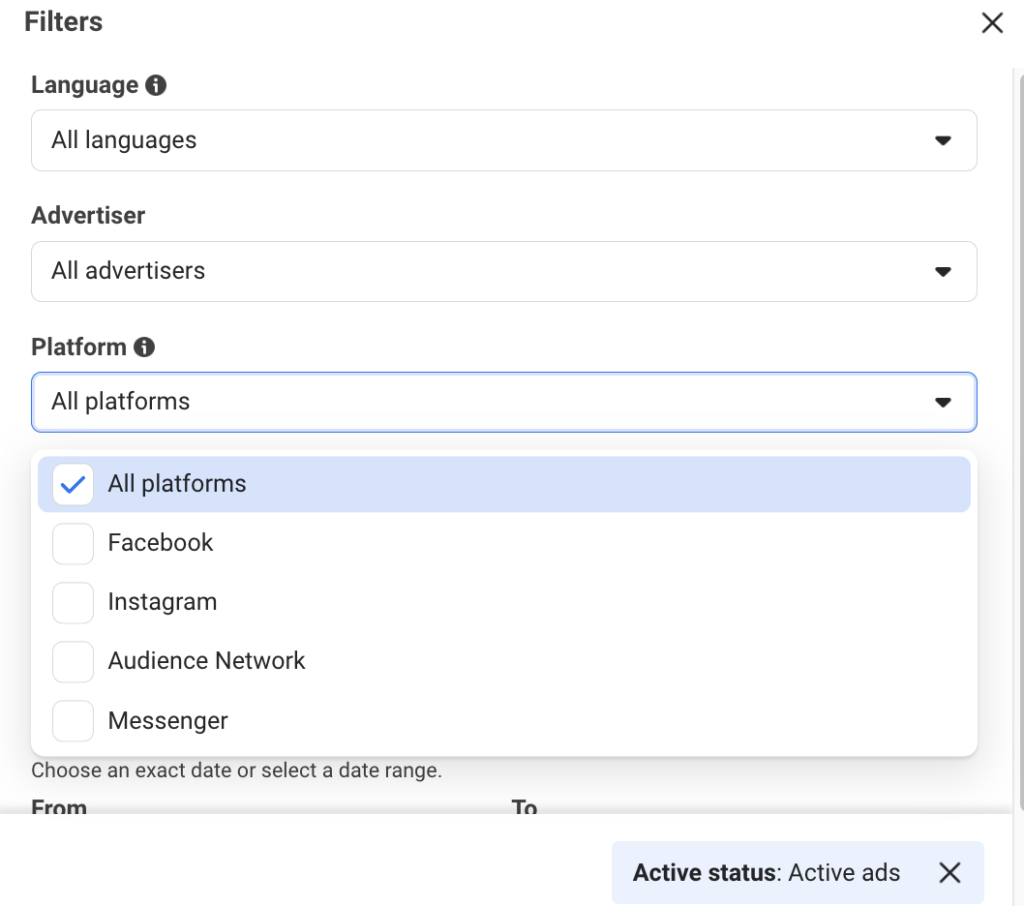
Meta Ads aren’t just limited to Facebook.
You can turn on filters to see the same ad across Facebook, Instagram, Audience Network, and Messenger.
This cross-platform view will help you understand where your competition is focusing efforts and how they may be modifying communications for different audiences.
Advanced Features
1. Granular Data Reporting
The Ad Library report allows for deep dives into data, focusing on specifics such as the amount spent, political ads, and social issues, often with additional details in certain regions like the EU.
Granular data breakdown by the advertiser, by amount spent, or by location can help so much in this amount of detail to realize the strategy behind not necessarily what ads are running.
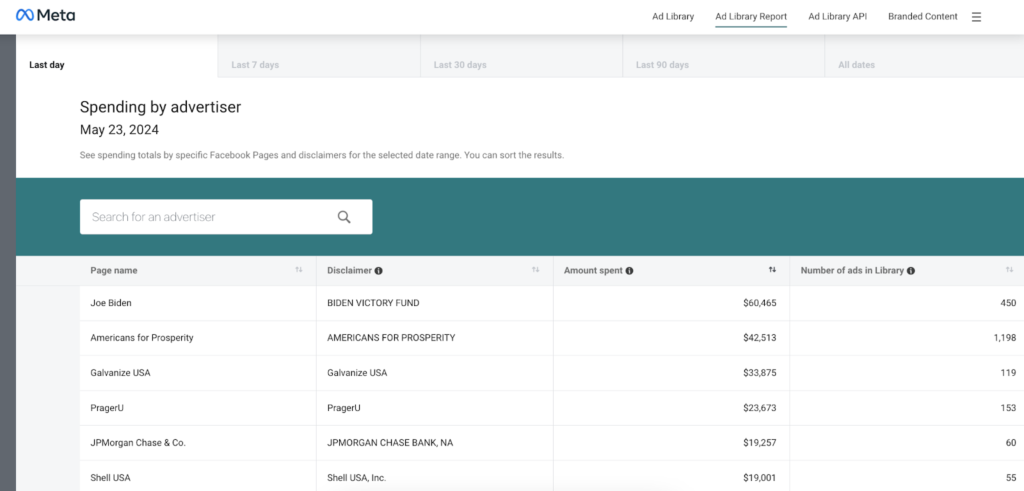
It’s like having a spy in their marketing department.
2. Saving Searches and Organizing Ads
Users can save ads of interest and organize them into collections for easy reference, facilitating better planning and strategy formulation.
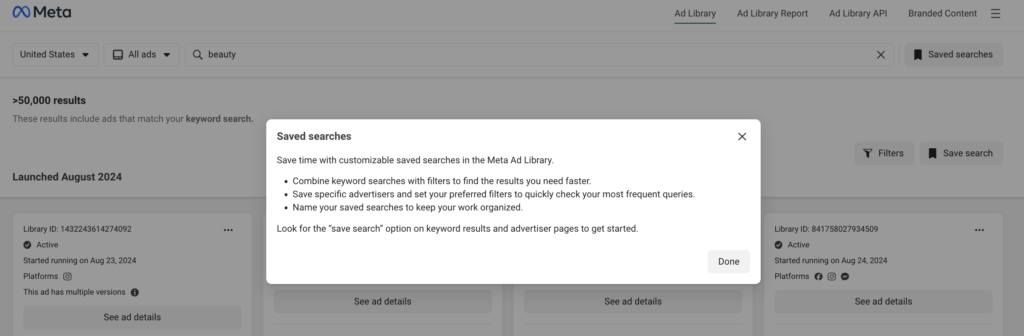
This is like your personal Pinterest board, but for ads.
The Ad Library lets you save ads you find interesting, and then you can organize them into collections for easy reference later on.
It’s really useful when planning future campaigns, so you can pull up examples of what inspired you or demonstrated a great strategy in practice.
3. Integration with Other Tools
Meta Ads Library is compatible with various extensions and tools like Ads Library or Foreplay. It enhances functionality and user experience by allowing ads to be saved directly to personal boards or shared with teams.
Recent Updates & Policy Changes (As Of February 2026)
Since the original publication, Meta has rolled out several key changes to the Ad Library and related transparency. Meta has been busy tweaking how its Ad Library works; some changes are technical, others are regulatory.
All of them impact what you’ll see (or not see) when running ad analysis in 2026.
Here’s what changed recently:
- May 2025: Marketing API v23.0 released
Meta launched a new version of its Marketing API, paired with Graph API v23.0. It streamlines how ad data is pulled and sets a new baseline for any developer workflows that integrate with the ad library API.
- August 2025: Content Library & API update
Meta expanded its Content Library & API, complementing the Ad Library with transparency tools for branded content, organic posts, and paid partnerships. If you’re comparing organic and paid efforts, this matters.
- October 6, 2025: Political and social issue ads banned in the EU
Meta officially stopped allowing new political, electoral, and social-issue ads to run in the European Union. Past SIEP (Social Issues, Elections, Politics) ads remain archived, but no new ones will be delivered in that region.
- October 2025: Ad Library coverage rules updated
Following the EU ban, Meta clarified new coverage terms:
- SIEP ads are still archived globally for 7 years.
- All other ad types in the UK/EU are visible for 1 year.
- Filters like beneficiary/payer, demographics, and reach breakdowns are still accessible via the ad library report and API.
- October–December 2025: New ad signals rolled out
Starting December 16, Meta began using conversations with in-app AI as a signal to decide what ads and recommendations users see. While this doesn’t change the Library directly, it shifts what you’ll find marked as currently running.
- February 2026: Threads ads go global
Meta expands ads to Threads users worldwide. These campaigns are now part of the broader ad inventory, meaning they’ll begin appearing in the Meta Ad Library, especially in cross-platform searches or multi-placement running ads.
15 Best Ways to Benefit from Meta Ad Library
Opening the Meta Ad Library can feel like staring into the void: hundreds of ads, endless filters, and no real sense of what to look for.
The good news: once you know where the value is, it becomes a strategic tool, not just a feed to scroll.
Here are 15 ways to make it work:
1. Analyze Competitor Strategies (And Even Steal Customers)
The Meta Ad Library gives you a clear look at what your competitors are putting money behind. So, dig into their ads: study the visuals, the messaging, how frequently they launch, and how often they update.
You’ll start to notice patterns. The kind of offers they push in Q4. How they react to market shifts. When they scale spend or pull back. This tells you more about their internal priorities than any press release.
💡Pro Tip: Every quarter, run a deep dive on your top competitors’ active ads. Tag what looks like prospecting, retargeting, and offer testing. Turn those insights into a playbook you can actually use to out-position them.
2. Spot Industry Trends
When you’re knee-deep in campaigns, it’s hard to see where the industry’s headed. The Meta Ad Library helps you zoom out.
Look at the common threads across active ads in your category; similar design language, messaging themes, even the rise of specific calls to action. These patterns tell you what’s gaining traction with real spend behind it.

Used consistently, it’s a reliable way to see where things are going before they show up in newsletters.
💡 Pro Tip: Pair your Library research with machine learning tools that track visual and text trends. You’ll start spotting subtle creative shifts that could define the next six months of advertising in your space.
3. Gather Creative Inspiration
The best ideas aren’t floating in a brainstorm. Actually, they’re already running live.
Use the Library to find high-performing ads and break them down. Note what makes them work: a fresh layout, a snappy hook, a format that feels native to the platform. Just as important, spot what’s been overused and start crossing ideas off your list.

💡 Pro Tip: Right after your Library review, hold a focused creative session. Don’t let ideas sit in a folder; turn what stood out into usable directions while the context is fresh.
4. Study Ad Performance Metrics (Updated in February 2026)
You won’t get clicks or conversions from the Library, but that doesn’t mean you can’t evaluate performance.
You’ll see spend ranges, impression estimates, and (if you’re looking at UK or EU markets) reach breakdowns by age, gender, and region. These aren’t vanity stats. They give you a clear view of what’s getting traction and staying live.
If you want more granularity, bring in tools like BigSpy, AdSpy, or SocialPeta. They help you reverse-engineer metrics like CTR or engagement rate. And if you’re running campaigns, connecting CAPI Meta gives you clearer data on conversions.

💡 Pro Tip: Build a performance dashboard that blends what you see in the Meta Ad Library with your own campaign data or trusted third-party insights. That gives you realistic benchmarks, not just guesses.
5. Conduct Market Research
Most market research is expensive or outdated. The Ad Library gives you something better: a live view of how audiences are actually being targeted and messaged to.
Use demographic filters (especially in the UK/EU) to explore how different segments respond to different formats and angles. You’ll quickly spot what kind of language or visuals resonate with each group.
You can also track how competitors adjust their targeting across regions or audiences, and see where your messaging overlaps or falls flat.
💡 Pro Tip: Combine Ad Library demographic insights with third-party consumer data. Together, they’ll help you refine your targeting strategy far beyond guesswork.
6. Learn About Ad Compliance
The compliance monitoring has shifted, and the Meta Ad Library reflects that.
Flagged or removed ads don’t appear publicly. Since September 2025, Meta also adjusted how it handles SIEP ads (Social Issues, Elections, and Politics).
In the EU, new political and issue-based ads are now banned. That means compliance signals for that category will no longer appear there.
So what does that mean in practice? Well, the Library becomes most reliable when you’re reviewing active ads, not trying to track down what was taken down.
If you need deeper insight into moderation patterns or enforcement trends, you’ll have to combine it with Meta’s Transparency Center and third-party watchdog reports.
💡 Pro Tip: When analyzing competitors in regulated industries, cross-check what you see in the Ad Library with public transparency reports. Gaps in visibility can be as informative as the ads that remain live.
7. Examine Successful Ad Copy

If you want to understand what drives clicks and conversions in your space, study copy that’s still running.
Pick ads that have been live for weeks and review the structure carefully. How do they open? Where do they introduce the offer? How do they build urgency? Pay attention to the calls-to-action and how they frame benefits versus features.
Also, look at how messaging shifts across demographics. In the UK and EU markets, you can see reach splits that hint at how different segments respond to the same creative.
💡 Pro Tip: Create an internal repository of effective ad copy grouped by objective: awareness, engagement, conversion. Keep it practical. Use real examples from the Library, so your team works from proven structures, not theory.
8. Refine Retargeting Approaches
Retargeting leaves patterns behind. The Meta Ad Library makes them visible.
Look at how competitors sequence their ads. You’ll often see an initial educational message followed by more direct offers or urgency-based creatives. Timing, repetition, and subtle copy changes reveal how they move prospects from interest to decision.
You can also compare active and inactive ads to see which variations were short-lived. That gives you clues about what didn’t convert well enough to sustain spend.
💡 Pro Tip: If you’re using dynamic creative optimization (DCO), review competitor variations and adjust your own retargeting flows accordingly. Align your sequencing with real-world behavior patterns instead of assumptions.
9. Adapt Strategies for Each Platform
Facebook, Instagram, and Messenger don’t behave the same way. The Meta Ad Library lets you see where ads are running and how creatives differ across placements.
Some brands lean into highly visual storytelling on Instagram. Others use more direct, text-driven calls to action on Facebook. Messenger ads may feel more conversational or personalized.

There’s also a structural limitation to keep in mind:
- Outside the UK and EU, you’ll only see SIEP ads in the Library.
- Inside the UK and EU, you get visibility into all ad types for one year, along with added transparency fields.
That difference changes how much context you have when comparing campaigns across regions.
💡 Pro Tip: Create custom analytics filters to compare similar ads running across platforms. Also, measure placement patterns and adjust budget allocation based on where similar creatives appear to scale.
10. Determine Effective Ad Formats
The Ad Library makes format analysis straightforward. You can quickly see whether your industry leans heavily into video, static images, carousels, or Stories.
Look beyond volume. Identify formats that stay live longer or appear in multiple variations. That suggests the advertiser is optimizing within that format rather than abandoning it.
Understanding these patterns helps you prioritize what to test next instead of spreading budget across too many creative types.

💡 Pro Tip: Run controlled A/B tests focused only on format. Keep the offer and targeting constant. Use insights from the Meta Ad Library to decide which formats deserve that budget.
11. Analyze Geographical Performance (Updated in February 2026)
If you’re targeting multiple regions, this part matters more than you think.
In the UK and EU, you get access to all ad types from the past year, plus breakdowns by age, gender, and location. That gives you solid insight into how brands adapt copy and visuals across markets.
Everywhere else? You’re stuck with SIEP ads only (Social Issues, Elections, Politics). And even that changed in October 2025, when the EU stopped allowing new uploads in that category. The archive still works, but it’s frozen.
💡 Pro Tip: Before running any geo-based analysis, confirm what data you actually have. The UK/EU gives you the most visibility for commercial ads. If you’re researching political campaigns, note that EU data cuts off in October 2025 (no surprises later).
12. Explore Budget Allocation Strategies
You won’t see exact dollar amounts in the Ad Library, but you can still read the patterns.
If a brand is running 20 versions of one ad, testing formats, rotating copy, and keeping it all live for weeks… they’re spending. If another brand’s ads show up for 3 days and disappear, you know what that means, too.
💡 Pro Tip: Track how many creatives your competitors are running per product or promo. Use that data to map spend priority and build smarter budget models for your own campaigns.
13. Adjust for Event-Driven Advertising (Updated in February 2026)
The Ad Library is perfect for spotting how brands prep for big events: seasonal launches, product drops, holidays, sports, and political cycles.
Look at ad volume and message shifts before and during these dates. You’ll start seeing playbooks for urgency, exclusivity, and time-sensitive messaging.
Just one thing: since October 2025, no new political or social-issue ads have appeared in the EU. That changes how much context you’ll get depending on the market.
💡 Pro Tip: Build an event calendar specific to your vertical. Cross-reference it with Library data from past years to plan campaign timing that hits when it matters most.
14. Understand Brand Positioning
This isn’t just about messaging; it’s identity what matter here.
Look at how brands define themselves in their ads. Some lean premium. Others push affordability. Some focus on values, others on outcomes. And the way they express that (visually and verbally) isn’t subtle.
You’ll quickly spot who’s leading with clarity… and who’s blending in.
💡 Pro Tip: Use the Library to analyze how each brand introduces itself in its top creatives. What’s the first thing they say? That’s the position. Write it down. Then ask yourself: where do you fit in that lineup?
15. Generate A/B Testing Hypotheses
The Meta Ad Library is basically a live feed of other brands’ A/B tests, if you know what to look for.
When you see a set of ads with minor tweaks in headlines, visuals, or CTAs, you’re likely looking at a split test. That’s your shortcut to hypothesis building: what are they testing, and how would you improve it?
It’s a smarter way to plan tests than starting from a blank doc.
💡 Pro Tip: Save ad variations that clearly come from the same campaign. Compare the differences, then plug your version into that same testing logic. Over time, you’ll sharpen not just what you test, but why you test it.
Quick Tips on How to Analyze Top-Performing Meta Ads
The Meta Ad Library is a place to study. But with thousands of ads in the system, knowing what to focus on makes all the difference.
Here are some things to look for when breaking down high-performing ads:
1. Start with the visual
What stands out? Look at colour palettes, framing, and recurring themes.
Are brands using studio shots or UGC? Static or video? A good ad usually communicates tone before you even read the copy.
2. Look for patterns in design
Strong ads aren’t randomly laid out. Check how they structure the creative: headline placement, CTA buttons, brand logos.
What’s consistent across top ads? What feels intentional? That layout often signals how the message is meant to be consumed.
3. Break down the copy
Don’t just read it; study it. Is it conversational or direct? Does it lean emotional, playful, urgent?
Some ads say a lot with five words. Others guide you through a full story. Focus on how the copy flows and where it leads the eye.
4. Spot the hook
Good ads open strong. Pay attention to the first line or visual cue. That’s what stops the scroll. If it doesn’t work there, nothing else matters.
Great hooks tend to show up again and again across top performers.
5. Think about who it’s for
Based on the tone, style, and references, who’s the target?
You can usually tell if an ad’s built for Gen Z, parents, freelancers, or corporate decision-makers. The best ads speak to one type of person, not everyone.
6. Compare platforms
Same brand, different placement. Look at how ads shift across Facebook, Instagram, and Messenger. On Instagram, visuals do the heavy lifting. On Facebook, there’s often more context and copy. That platform shift reveals what matters to each audience.
7. Use the filters, seriously
Don’t rely on what shows up first. Use filters to search by date, region, format, or activity status.
This lets you isolate recent campaigns, see what’s still running, and avoid dead ads that don’t tell you much.
8. Track what your competitors are doing
Check their most active campaigns. How many variants are live? What angles are they testing? If they’re running 10 different ads for the same product, there’s something worth watching. You don’t need to copy, but you should understand what they’re betting on.
9. Watch for trends in real time
Sometimes trends show up as a meme format. Other times it’s a new editing style, CTA phrasing, or visual format.
If you start seeing the same thing across unrelated brands, save it. That’s how most trends start: quietly, then suddenly everywhere.
10. Save what works, and build your own system
Don’t rely on memory. Use tools or folders to collect ad examples worth revisiting. Organize by brand, theme, format, or goal. Over time, that becomes a custom swipe file that’s 10x more useful than inspiration boards.
Challenges and Limitations of the Meta Ad Library
The Meta Ad Library is powerful, but it’s not perfect. And if you’re using it to make serious decisions, it’s worth knowing where it falls short.
Here’s what to keep in mind when using the Library:
⚠️ What the Meta Ad Library doesn’t give you (and why it matters)
- No engagement or conversion metrics. You’ll see spend ranges and impressions, but not CTR, CPC, or conversions. That limits how deeply you can evaluate ad performance.
- Removed or flagged ads don’t show up. If a campaign violated policy or was pulled before approval, it’s gone. That leaves blind spots, especially when you’re tracking aggressive testing strategies.
- Some ads get more visibility than others. Results may skew toward high-budget or heavily optimized ads. This can distort what “normal” looks like across your niche.
- Algorithmic ranking plays a role. What you see first isn’t always what matters most. The Library sorts results, but not always in a way that reflects strategic relevance.
- Coverage varies by region. Outside the UK/EU, you’ll mostly see SIEP ads. And since October 2025, no new SIEP content has appeared in the EU at all. That limits political/issue visibility in those markets.
🛠️ How to work around those limitations
- Cross-check your data. Don’t rely on the Ad Library alone. Tools like Google Analytics, AdEspresso, or SocialPeta can help you connect performance signals with on-platform behavior.
- Track updates regularly. Ads change fast, especially during campaigns. If you’re tracking competitors or trends, check weekly and note what stays, what shifts, and what disappears.
- Focus on qualitative patterns. Not everything valuable is in the numbers. Pay attention to voice, format, framing, and creative shifts. Sometimes, that tells you more than performance metrics.
- Use advanced filters. Narrow by date range, media type, and active status to find relevant ads faster. This helps cut noise and spot meaningful signals.
- Layer your tools. Combine the Ad Library with platforms like TubeOnAI or your internal dashboards. The goal is to make it part of a bigger stack that gives you context, performance, and creative direction.
The takeaway here? The Meta Ad Library shows you a lot, but not everything.
It’s a strong foundation for ad analysis, but like any tool, it works best when used alongside others.
Bottom Line: Make the Meta Ad Library Part of Your Workflow
As you can see, the Meta Ad Library isn’t just a place to poke around. It’s where you get real visibility into what’s working (and what’s not) across Meta’s ad ecosystem.
It won’t think for you. But if you treat it like a research tool (not just another browser tab), it gives you the kind of insight most advertisers pay platforms to hide.
So, set up your process, pull examples, and tag what matters. Watch what stays live and what disappears.
The patterns are there; you just have to be the one actually looking for them.
Your next campaign won’t get better by accident. This is where it starts.
FAQs
What is the purpose of the Meta Ads Library?
The Meta Ads Library was originally built to bring transparency to political and issue-based advertising. Today, it’s evolved into a go-to tool for marketers, researchers, and analysts who want to track how real brands spend real budget across Meta platforms.
Where can I access the Meta Ad Library to search for ads?
You can access it directly at facebook.com/ads/library. No login required. Just start typing in a page name, keyword, or advertiser category, and you’ll see what’s running.
How does the Meta Ad Library work?
It pulls ad data directly from Meta’s ecosystem (Facebook, Instagram, and Messenger), and shows active or recently active ads. You can filter by country, platform, media type, or keyword. The results update frequently, and what you see reflects what’s visible to users in those regions.
What types of ads are included in the Meta Ad Library?
It depends on where you’re searching from. In the UK and EU, you’ll get access to all ad types for the past year, including commercial campaigns. Everywhere else, the Library mainly shows ads related to social issues, elections, and politics. Those stay archived for up to seven years, but commercial ad visibility is more limited outside regulated regions.
What data can I get from the Meta Ads Library?
You’ll be able to see spend ranges, impression estimates, run dates, ad status, and where the ad is running. If you’re viewing ads in the UK or EU, you’ll also get demographic and regional breakdowns. What you won’t see are metrics like click-through rates, conversions, or engagement stats; that kind of data lives outside the Library.
Does the Meta Ad Library show all ads?
Not quite. You’ll only see ads that are currently live or were recently active, plus certain archived SIEP ads. Anything that got flagged or removed won’t appear, and that creates some gaps, especially if you’re trying to reverse-engineer failed or borderline campaigns.
What limitations or restrictions exist when using the Meta Ad Library?
You won’t get full visibility or deep performance data. Engagement metrics like CTR or conversions aren’t available, and the ads you see can vary by region or algorithmic sorting. Also, some ads never show up, especially if they were flagged, removed, or ran in markets with limited coverage. It’s a strong research tool, but not a full analytics platform.
Learn more: