
If you’ve ever tried tracking down the right email address for a prospect or candidate, you already know the drill: endless Googling, outdated data, bounced messages, and way too much manual work.
Now, when speed and personalization matter more than ever, no marketer or salesperson has time for that.
That’s exactly where ContactOut steps in.
ContactOut is a popular contact-finding tool that helps you uncover verified email addresses, direct dials, and profile details, usually right from LinkedIn.
With just a click, you can reveal contact info, save people into lists, export them to your CRM, or kick off email campaigns. For busy sales and marketing teams running outbound motions, it’s a huge time-saver.
Whether you’re building targeted prospect lists, nurturing high-value accounts, or filling the top of your funnel with quality leads, ContactOut aims to make outreach easier, faster, and a whole lot more efficient.
Let’s go through exactly what ContactOut does, its key features, real pros and cons, and the most up-to-date pricing.
By the end, you’ll know whether ContactOut deserves a spot in your outbound toolkit, and how to get the most value if you choose to use it.
What Is ContactOut?
At its core, ContactOut is a contact-finding and lead-generation tool that helps you uncover emails, phone numbers, and profile details for millions of professionals.
If you spend a lot of time on LinkedIn looking for decision-makers, prospects, or candidates, ContactOut becomes your “shortcut button” for getting in touch without the tedious research.
Think of it as a prospecting booster for marketers, founders, and sales teams who want fast, accurate data so they can spend more time on actual outreach, not detective work.
How ContactOut works
ContactOut gives you two main ways to discover contacts:
- A Chrome Extension
- This is the magic most people love.
- You browse LinkedIn as usual.
- ContactOut pops up with verified emails (sometimes multiple), phone numbers, and social links.
- One click, and the contact goes straight into your lists.
- A Web Search Portal
- Perfect when you want to find people without manually visiting profiles one by one.
- Search by job title, industry, company, seniority, keywords, or location.
- Build segmented prospect lists in minutes.
Behind the scenes, ContactOut pulls from a massive data pool of professional profiles and verified emails, making it a powerful companion for outbound sales, account-based marketing, and recruitment workflows.
Where ContactOut shines most
Salespeople and marketers use ContactOut to:
- Find accurate email addresses instantly
- Build targeted prospect lists
- Enrich CRM records
- Speed up research for outbound campaigns
- Personalize outreach with more complete profile data
If you’re running any form of outreach (cold campaigns, ABM, demand gen, partnership outreach, user interviews, or recruiting), ContactOut helps you move faster and hit more inboxes with confidence.
Is ContactOut Legal?
Yes, ContactOut is legal to use, as long as you follow standard data-protection and outreach best practices.
Like most contact-finding tools, ContactOut gathers professional information from publicly available sources and complies with major privacy regulations such as GDPR and CCPA.
The platform also provides an opt-out mechanism for individuals who don’t want their data displayed.
That said, legality also depends on how you use the data. If you’re emailing prospects in the EU, for example, you’ll want a legitimate interest (B2B outreach typically qualifies) and a clear way for people to unsubscribe.
In short: ContactOut gives you the tools, but responsible, compliant outreach is still in your hands.
Key Features of ContactOut (2026)
ContactOut packs a surprising amount of functionality into a tool that’s known for being simple and lightweight. Whether you’re building targeted prospect lists, running outbound campaigns, or enriching CRM records, these features are what make ContactOut a go-to for marketers and sales teams in 2025.
1. ContactOut Chrome Extension + LinkedIn Integration
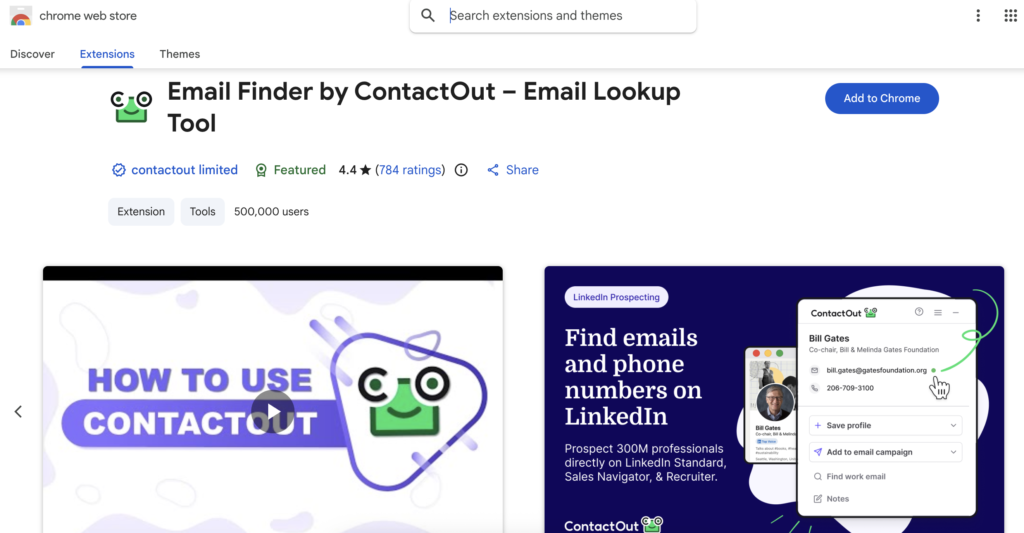
This is the feature everyone talks about, and for good reason.
With the ContactOut Chrome extension installed, you can browse LinkedIn like normal while the tool quietly reveals:
- Verified work and personal emails
- Phone numbers
- Social links
- Additional profile details
It’s one of the fastest ways to capture prospect info without breaking your workflow. No more switching tabs, guessing email formats, or scraping random directories.
Why marketers love it:
You can go from discovering a lead → saving them to your list → emailing them, all in under a minute.
2. Search Portal (Web App)
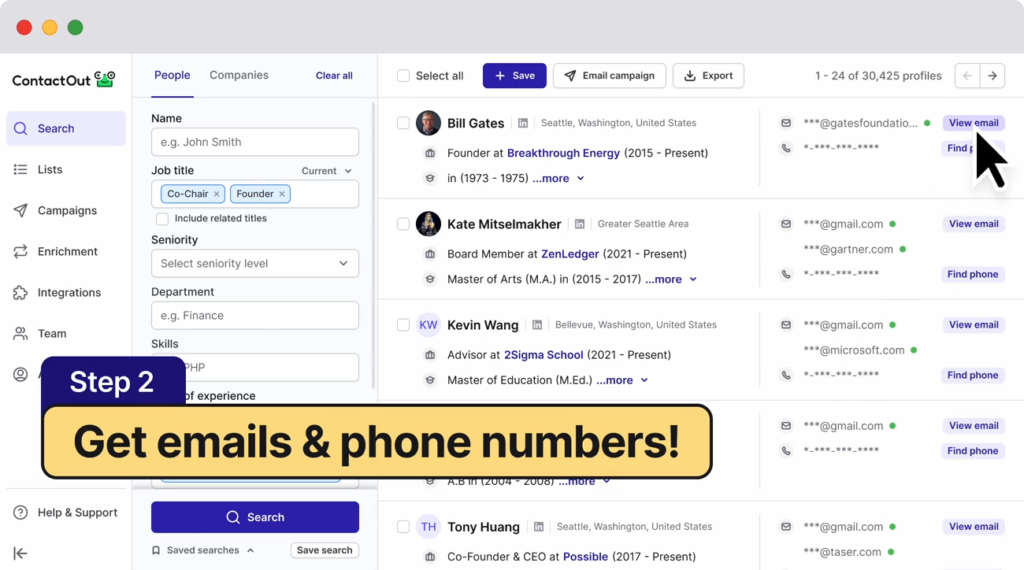
If you want to build bigger lists or work beyond LinkedIn, the Search Portal is your best friend.
Filter by:
- Job title or keyword
- Company
- Industry
- Seniority
- Geography
- Skills
- …and more
It’s excellent for building targeted segments. Think CMOs in SaaS, Heads of Partnerships in Europe, or Recruiters at tech startups.
Great for:
- Account-based marketing
- Persona-focused prospecting
- Market research
- List-building at scale
3. Large, High-Quality Contact Database
ContactOut’s database covers:
- Hundreds of millions of professionals
- Tens of millions of companies
- Verified emails
- Occasionally, multiple email addresses per person
- Direct and mobile phone numbers (availability varies)
Email accuracy is ContactOut’s strongest point, and the tool is often praised for having better personal email coverage than many competitors.
Heads up: Phone data is improving, but like all tools in this category, accuracy varies. Treat phone numbers as “nice to have,” not guaranteed.
4. Bulk Search + CSV Export
When you need to work through lots of data, ContactOut supports:
- Bulk uploading names or domains
- Enriching lists of contacts
- Exporting to CSV
- Syncing into CRMs or outreach tools
It’s perfect for sales teams prepping sequences or marketers prepping big outbound or ABM campaigns.
5. Email Campaigns & List Builder
One of the newer improvements: you can send multi-step email sequences directly inside ContactOut.
Features include:
- Email sequences
- Outreach-style automation
- List management
- Basic analytics
For some users, this means you can cut out a separate outreach platform. For others, this works as a lightweight backup for quick campaigns.
Good for:
- Quick outreach bursts
- Follow-up sequences
- Testing messaging without a full tech stack
6. AI Email Writer (Personalizer)
ContactOut includes an AI writer that helps:
- Draft cold emails
- Personalize messages
- Rewrite templates in different tones
- Speed up copywriting for outreach
It’s handy for marketers and sales reps who want to avoid writer’s block and get emails out faster. You’ll still want to personalize manually, but the AI gives you a strong starting point.
7. Data Enrichment
The Email + Phone plan unlocks:
- Additional profile details
- Company metadata
- Updated contact information
- Email/phone enrichment for your lists
This is useful when you’re cleaning up CRM data or prepping outbound lists for better segmentation.
8. Integrations & Team Tools (Team/API Plan)
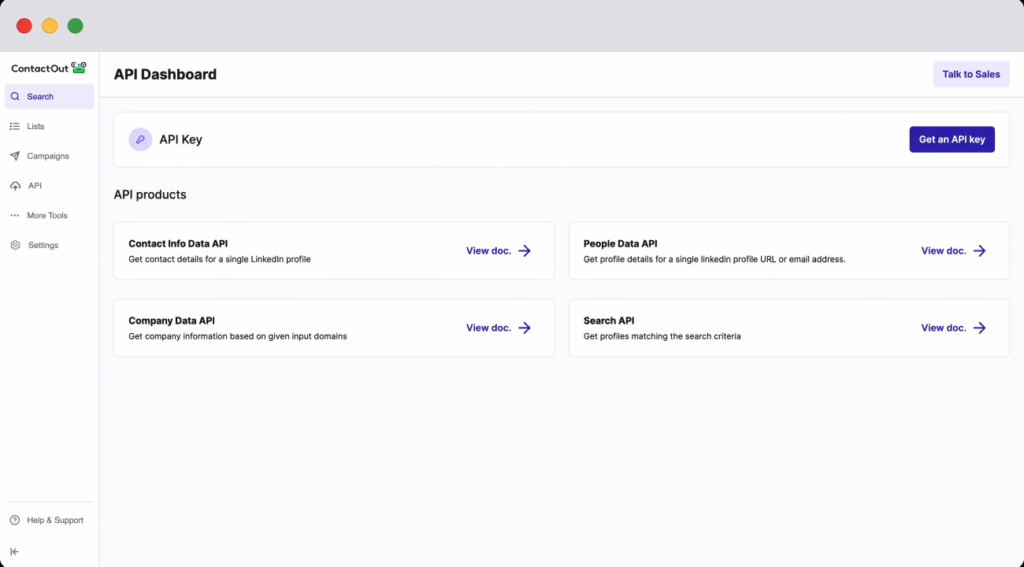
For larger teams, ContactOut offers:
- API access
- Salesforce + ATS integrations
- Team management (users, permissions, reporting)
- Bulk license support for 700M+ profiles
- Dedicated account manager
This makes it scalable for agencies, demand-gen teams, and full-funnel sales organizations.
Onboarding & Ease of Use
One of the biggest perks of ContactOut, especially for busy sales and marketing teams, is how fast you can get up and running. There’s no complex setup, no heavy integrations required, and no steep learning curve. You can literally start finding emails within minutes of signing up.
Getting Started
Getting into ContactOut is refreshingly simple:
- Sign up with your work email
- Install the Chrome extension (takes seconds)
- Open LinkedIn. ContactOut instantly activates
- Start revealing contact details and saving leads
If you prefer to work from the dashboard, the Search Portal is ready right away, too.
There’s no onboarding call, no long setup wizard, and no “enterprise-style” configuration. It’s built for speed.
Using the Tool Day-to-Day
Sales reps and marketers often describe ContactOut as “lightweight but powerful.” Everything happens in a clean, simple interface:
✔ The extension pops up only when needed
✔ The dashboard is easy to navigate
✔ Lists are simple to organize
✔ Exports take one click
✔ Campaign setup is straightforward
If you know how to use LinkedIn, you can use ContactOut. It feels like a natural extension of your existing workflow.
Learning Curve
There basically isn’t one.
This is why so many SDRs, founders, and even non-technical marketers love ContactOut. You don’t need training videos or documentation to figure it out.
Instead of onboarding for days, most users get value within 5–10 minutes of installing the extension.
Support & Resources
ContactOut provides:
- A help center with short, clear guides
- In-app tooltips and onboarding messages
- Email support
- Live chat (availability may depend on your plan)
- Occasional tutorials and best-practice articles
Response times are generally solid, and the support team is known for being friendly and helpful. For a tool at this price point, the level of support is surprisingly good.
ContactOut Pricing & Plans (2025)
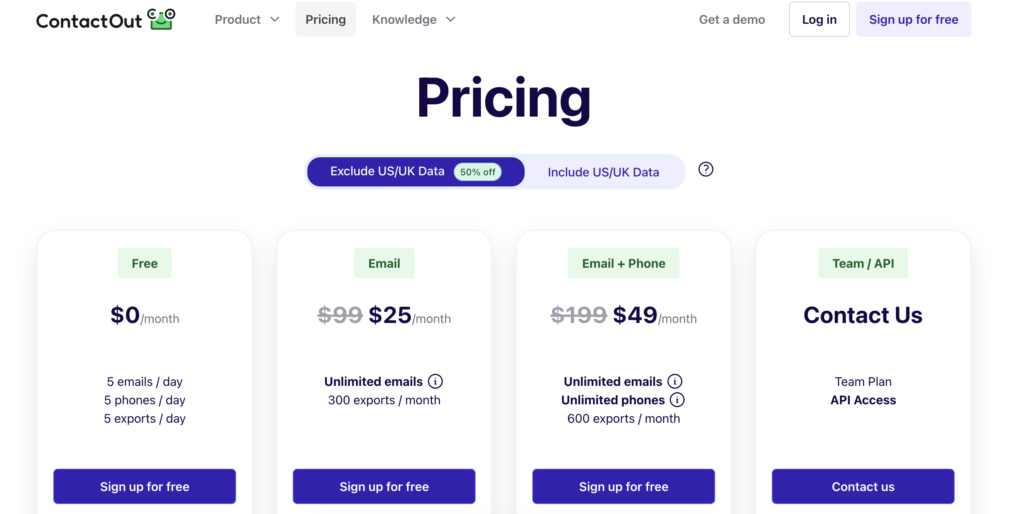
One thing marketers and sales teams appreciate about ContactOut is that the pricing is straightforward and flexible. Whether you’re a solo SDR, a founder doing your own outreach, or part of a larger revenue team, there’s a plan that fits your prospecting volume.
Here’s the latest 2025 pricing, based directly on the screenshots you shared.
Free Plan – $0/month
If you just want to test the waters or only need a small handful of contacts each day, the Free plan is actually pretty generous.
You get:
- 5 emails per day
- 5 phone numbers per day
- 5 exports per day
- Browser extension
- Access to the search portal
- Trial access to premium features
- 1 user per company
Who it’s best for: Marketers or founders doing light research, early-stage teams, and anyone wanting to try the tool without commitment.
Email Plan – $25/month
(Discounted from $99/month / “Exclude US/UK Data” 50% off option)
This plan is perfect if email outreach is your primary channel and you don’t care as much about phone numbers.
You get:
- Unlimited emails
- 300 exports per month
- List Builder
- Email Campaigns
- Search Portal
- Chrome extension
- 1 user per company
Best for: Outbound marketers, SDRs, and founders who send a steady stream of cold emails and want a reliable email source without overpaying.
Email + Phone Plan – $49/month
(Discounted from $199/month / “Exclude US/UK Data” 50% off)
This is the most popular plan for people doing serious outbound.
You get:
- Unlimited emails
- Unlimited phones
- 600 exports per month
- Data Enrichment
- List Builder
- Email Campaigns
- AI Email Writer
- Chrome extension
- Search portal
- 1 user per company
Best for: Sales teams, marketers, and recruiters who need both strong email coverage and access to phone numbers for multi-channel outreach.
Team / API Plan – Custom Pricing
This is where ContactOut becomes a scalable solution for agencies, bigger revenue teams, or high-volume enrichment needs.
You get:
- API access
- 20% more data coverage
- Bulk license access to 700M+ profiles
- Salesforce + ATS integrations
- Team management tools
- Usage reporting
- Dedicated account manager
Best for: Outbound agencies, growth teams, sales orgs doing heavy sequences, and companies that rely on deep data enrichment and automation.
Quick Pricing Comparison
| Plan | Price | Emails | Phones | Exports |
|---|---|---|---|---|
| Free | $0 | 5/day | 5/day | 5/day |
| $25 | Unlimited | – | 300/mo | |
| Email + Phone | $49 | Unlimited | Unlimited | 600/mo |
| Team / API | Custom | Highest coverage | Highest | Scalable |
Pros & Cons of ContactOut
Like any lead-gen or data tool, ContactOut has clear strengths and a few limitations you should know before you add it to your outbound stack.
Here’s the honest breakdown for marketers, sales teams, and founders doing cold outreach in 2025.
Pros
1. Excellent Email Accuracy
ContactOut is known for delivering reliable, verified emails, often including both work and personal addresses. For outbound marketers and SDRs battling deliverability issues, this is huge. Fewer bounces, more replies.
2. The Chrome Extension is a Game-Changer
If you live on LinkedIn (and most outbound pros do), the extension saves hours. Instead of digging around the internet, the emails pop up instantly on the profiles you’re already visiting.
3. Fast List Building
Between the Search Portal and the extension, you can build hyper-targeted lists in minutes:
- CMOs in SaaS
- Founders in health tech
- Directors of Partnerships in the U.S.
It’s perfect for ABM and persona-based segmentation.
4. Great For Small Teams or Solo Outbound
The Free and $25 plans are budget-friendly, especially compared to heavier platforms. ContactOut gives you enterprise-level data without enterprise-level pricing.
5. Built-In Email Campaigns + AI Writer
You can write and send sequences right inside the platform. For smaller operations, ContactOut can replace an outreach tool entirely.
6. Simple, Clean, Easy to Use
No steep learning curve. No complicated setup. Just install → open LinkedIn → start finding leads.
7. Scalable Options for Teams
With API access, Salesforce/ATS integrations, and team reporting, ContactOut works for agencies and larger sales orgs too.
Cons
1. Credit Limits Can Run Out Fast
On lower plans, exports are limited (300–600/month). If you’re doing high-volume outbound or working across multiple markets, you may hit the cap quickly.
2. Phone Number Accuracy Varies
ContactOut is strong with email, phones, but not as much. You’ll get phone numbers, but treat them as a bonus, not a guarantee.
3. Not Ideal for Large-Scale Data Teams
If you need 50k+ contacts a month, or deep firmographics, intent data, etc., ContactOut may feel lightweight. Tools like Apollo or ZoomInfo might scale better (at a much higher price).
4. Limited Automation Compared to Full Outreach Platforms
The built-in campaigns are good, but not as robust as Outreach, Salesloft, or Smartlead. If you need complex workflows, A/B testing, or shared sequences, you’ll still want a dedicated tool.
5. US/UK Data Restrictions on Discounted Plans
The discounted plans exclude US/UK data, which might be a deal breaker if most of your outbound targets those markets.
6. Phone-Heavy Teams Won’t Love It
If your strategy relies on cold calling, you’ll want a tool known for dial accuracy. ContactOut is email-first.
Ideal Use Cases & Who ContactOut Is Best For
ContactOut isn’t trying to be everything for everyone. Instead, it shines brightest in specific workflows, especially where quick, accurate email discovery can make or break your outbound results.
Here’s a clear look at who benefits the most from ContactOut, and when you might want to consider something else.
Best For: People Who Want Faster, Smarter Outbound
1. SDRs & Sales Reps Doing Daily Prospecting
If you spend half your day on LinkedIn researching leads, ContactOut becomes your productivity cheat code.
Emails pop up instantly → you add prospects to lists → you start sequences faster. Less research. More conversations.
2. Marketers Running ABM or Outbound Campaigns
Got a list of target companies? Need CMOs, Heads of Partnerships, or senior ICs? The Search Portal makes persona-based list building effortless and export-ready.
3. Founders, Solo Marketers & Small Teams
If you’re wearing multiple hats and don’t have time for manual research, ContactOut gives you enterprise-grade contact data without ZoomInfo pricing.
It’s perfect for:
- Cold outreach for partnerships
- Customer development interviews
- Recruiting early hires
- Investor outreach
4. Recruiters & Talent Sourcers
Although this article focuses on marketers, it’s worth noting: ContactOut is extremely popular with recruiters because of its high email accuracy and LinkedIn extension experience.
Good For: But With Some Caveats
5. Agencies Running Outbound for Clients
Agencies love ContactOut for speed and affordability. Just note: If you handle thousands of contacts every month per client, you may hit export limits on the lower-tier plans.
6. Teams That Want a Simple All-In-One Tool
If you want:
- Contact data
- Basic campaigns
- AI email writing
- Simple list management
…all in one place, ContactOut checks all the boxes. Just don’t expect advanced automation like Outreach or Salesloft.
Not Ideal For
❌ Huge Sales Teams Needing 50k+ Leads/Month
If your outbound volume is massive, you’ll outgrow the export limits fast. At that scale, ContactOut still works, but only with its Team/API plan.
❌ Call-First or Phone-Heavy Sales Orgs
Phone number accuracy is hit-or-miss across the industry, and ContactOut is no exception. If calling is your main channel, you’ll want a dialer-focused data provider.
❌ Teams Needing Deep Product or Intent Data
ContactOut is about contact info. If you need:
- Firmographics
- Technographics
- Intent signals
- Buying committee mapping
…then you’ll need to supplement it with another platform.
How to Get the Most Out of ContactOut
Using ContactOut is already straightforward, but a few smart habits can massively improve your results. Whether you’re sending cold emails, building prospect lists, or enriching your CRM, these best practices will help you squeeze the most value out of the platform.
1. Use the Chrome Extension for Fast, Targeted Prospecting
If you want to save time (and who doesn’t?), make the Chrome extension your best friend.
Whenever you’re browsing LinkedIn:
- Open a prospect’s profile
- Let ContactOut pull emails + phones
- Save them to your list on the spot
This is perfect for:
- Account research
- Persona-based outreach
- Manual, high-quality lead building
The extension alone can cut prospecting time in half.
2. Build Segmented Lists in the Search Portal
Want to go beyond one-by-one profile visits? Use the Search Portal to build lists with advanced filters like:
- Job title
- Role seniority
- Company size
- Industry
- Region
- Keywords
This is where marketers can shine. Start by building tight segments. Then align messaging to:
- Industry pains
- Role-specific challenges
- Use cases
- Competitor comparisons
Well-segmented outreach always gets better engagement.
3. Enrich Your CRM Before Launching Campaigns
If you’re exporting data to HubSpot, Salesforce, Apollo, or another CRM, enrich before emailing. This helps you:
- Reduce bounce rates
- Improve deliverability
- Personalize messaging
- Prioritize hotter accounts
Clean data = stronger campaigns.
4. Combine the AI Email Writer With Your Own Voice
ContactOut’s AI writer is a great starting point, especially for:
- First-touch cold emails
- Follow-up sequences
- Refreshing stale templates
But the best results happen when you:
- Add personal touches
- Reference the prospect’s work
- Keep the tone natural and conversational
AI gets you 80% of the way. Your personality gets the reply.
5. Track and Optimize Your Export Usage
On the Email and Email+Phone plans, exports are capped (300–600/month).
To avoid running out mid-campaign:
- Export only high-value contacts
- Keep lists tight and targeted
- Remove duplicates or unqualified prospects
- Use bulk exports only when necessary
Quality > quantity every time.
6. Pair ContactOut With Your Favorite Outreach Tool
If you use tools like:
- Smartlead
- Instantly
- Apollo
- Outreach
- Salesloft
- HubSpot Sequences
…ContactOut becomes the data engine behind your outbound.
Best practice:
- Build or enrich your list with ContactOut
- Send campaigns from your dedicated outreach tool
- Track replies, meetings, and attribution at the source
This gives you the best of both worlds.
7. Warm Up Your Sending Domains
If you’re using ContactOut’s built-in email campaigns or sending campaigns elsewhere, always warm up your domain first.
Warm domain =
✔ fewer spam flags
✔ more deliverability
✔ higher reply rates
Even the best email list won’t perform well without a warm sender reputation.
8. Regularly Clean Up Your Lists
Once a month (or once per campaign), clean your lists to remove:
- Bounced emails
- Unresponsive contacts
- Duplicates
- Bad fits
- Outdated roles
Cleaner lists = better engagement and more accurate reporting.
Alternatives to ContactOut (2025)
If you like what ContactOut does, but want different trade-offs (more automation, different pricing, better bulk support, or deeper company data), there are several excellent alternatives worth considering:
Apollo.io
- A full-fledged sales-intelligence and outreach platform: database search, verified contact data, enrichment, CRM syncing, and outreach sequencing, all in one.
- Especially useful if you want more than just “find contact → export”: it supports digging into company & decision-maker data, multi-channel workflows, and scaling outreach.
Snov.io
- Combines email/phone lookup with built-in outreach tools, automation, and even email warm-up & deliverability tools. Great if you want a lightweight, all-in-one tool (less juggling between platforms).
- Useful for teams that want to manage prospecting → outreach → follow-up inside one environment.
UpLead
- Strong focus on real-time verification: each email is validated before being delivered, which reduces bounce risk and wasted outreach efforts. Good for when data hygiene is critical.
- Better option than ContactOut if you care less about having a Chrome extension / LinkedIn overlay and more about clean, up-to-date B2B contact data for bulk campaigns.
Hunter.io
- Known for domain-based searches (e.g., finding corporate email patterns) plus email verification. Good if you want broad corporate outreach rather than targeting via LinkedIn profile.
- More affordable than many full-stack tools, useful if you mostly need business domain addresses rather than personal or personal-work combinations.
Lusha
- Simple Chrome extension, easy to use; often used as a fast way to get verified contacts (email, phone), especially for North American / European markets.
- A solid choice if you want a ContactOut-like “quick find on LinkedIn” tool, possibly with different coverage or at a different price/credit structure.
Dropcontact (or other GDPR / enrichment-first tools)
- Instead of relying on “scraped” databases, Dropcontact generates or verifies contact data in real time, which can give fresher, more compliant results (particularly for EU / GDPR-sensitive markets).
- A good fit if compliance or data freshness is critical, or if you find that “old database” data from standard tools is becoming unreliable.
How to Pick the Right Tool
Here’s a quick guide depending on your needs:
- ✅ You want everything in one platform (data + outreach + CRM sync): Apollo.io or Snov.io
- ✅ You care about data accuracy and low bounce rates for bulk campaigns: UpLead, Hunter.io, or Dropcontact
- ✅ You want a tool similar to ContactOut (LinkedIn-based, quick extension) but maybe different data coverage or pricing structure: Lusha or Hunter.io
- ✅ You operate in GDPR region or care about compliance & fresh data: Dropcontact or UpLead
- ✅ You send high volumes of outreach and need automation + pipeline management: Apollo.io or Snov.io
Conclusion
If you’re in sales or marketing, you already know that the hardest part of outbound isn’t sending emails.
It’s finding the right people to send them to. That’s exactly where ContactOut delivers real value.
With its accurate email data, simple Chrome extension, easy list building, and affordable pricing, ContactOut gives you a fast and reliable way to discover prospects without interrupting your workflow.
It’s perfect for anyone who lives on LinkedIn, builds targeted outreach lists, or runs cold email campaigns that depend on clean, verified contact data.
Is it the most advanced platform on the market? No. Does it have the deepest automation or the most robust phone data? Not quite.
But for everyday prospecting (the kind marketers, founders, and SDRs do constantly), ContactOut hits a sweet spot: easy, fast, accurate, and budget-friendly.
If you’re looking for a tool that helps you move quickly, spend less time researching, and more time actually starting conversations, ContactOut is absolutely worth a try.
The free plan makes it a risk-free way to see how much smoother your outbound workflow can be.
And if you ever outgrow it, there’s no shortage of tools to complement or expand what ContactOut starts for you.