What 10,000 Daily Support Conversations Teach About Writing Copy in the Words Customers Actually Use


In this article
Every SaaS team I know tests its copy the same way: a marketer writes two versions of a headline, the team argues about which one sounds better, and an A/B test settles it a few weeks later.
Meanwhile, the most honest copy research the company owns is sitting one tab away, unread. It is the support inbox.
I run support operations at scale. My team handles more than 10,000 customer interactions a day, and I scaled that team from 30 to more than 200 agents while holding quality above 95%.
For years I treated tickets as an operations problem: answer them fast, keep the queue down, move on.
The change came when I started reading them as a copywriter instead of a manager. Customers were telling us, in their own words, exactly what confused them, what they expected the product to do, and what they were trying to buy.
Our landing pages were written in our words. The tickets were written in theirs. The gap between the two was generating contacts we never needed to have.
This article is the method that came out of that realisation: how to mine support conversations for copy, which phrases we have learned to treat as buying signals and which as churn warnings, the weekly routine that turns ticket language into page changes, and one worked example of the routine running on a real queue.
A note on evidence before we start: we did not run controlled conversion experiments on these copy changes, so this article makes no conversion claims.
What we measured, and what I can stand behind, is what happened on the support side: which questions stopped arriving, how repeat contacts moved, and what happened to first-contact resolution and handle time while we worked this way.
Where a pattern below comes from reading queues rather than from a controlled study, I say so.
Why support tickets are the honest copy test
A survey asks customers what they think. A ticket shows you what a customer did when something went wrong at the exact moment they cared enough to write. That difference matters for copy.
Three properties make tickets better copy research than anything else a SaaS team collects:
First, tickets are unfiltered. Nobody performs for a support agent. A customer who writes "I just need the report my boss asked for, where is the export button" is not guessing what you want to hear. They are describing the job they came to do, in the words they would type into Google.
Second, tickets are timed. A question asked in the first hour of a trial means something different from the same question asked in month six.
When you read tickets in order, you can see where in the journey your copy fails: the promise on the pricing page that the onboarding email never repeats, the feature name on the landing page that nobody uses inside the product.
Third, tickets repeat. One confused customer is an anecdote. Forty customers using the same wrong word for the same feature in one week is a copy defect with a count attached.
Part of how we hold quality above 95% is that we fix the page instead of answering the same question forever. Every repeat question is a page that did not do its job.
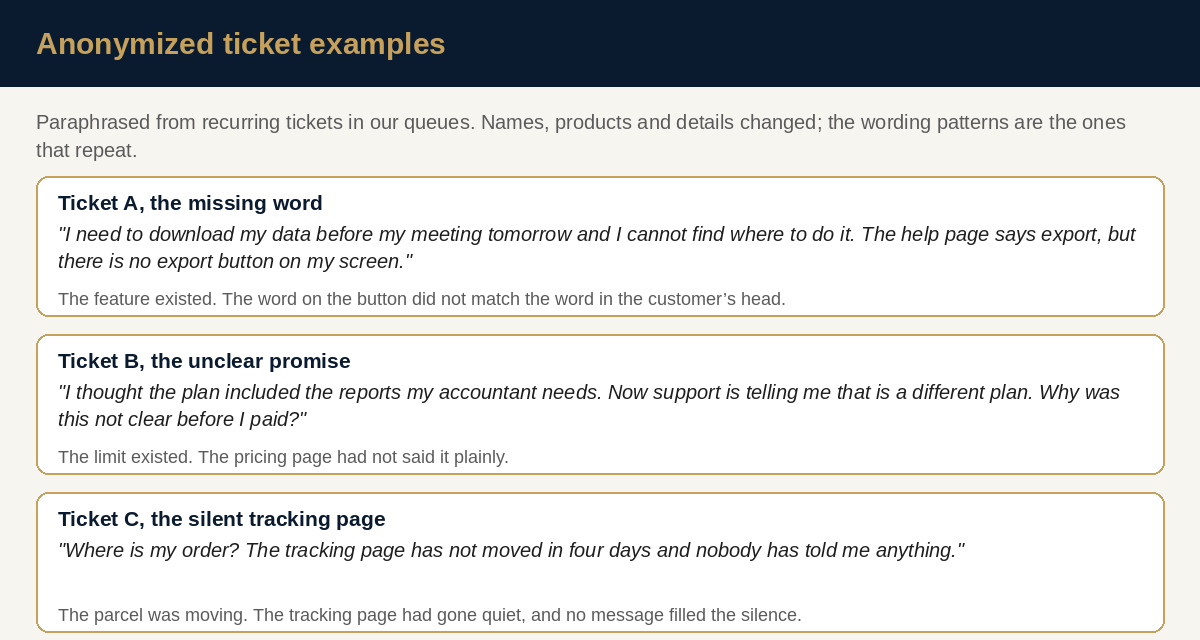
To make this concrete, here are three anonymized examples, paraphrased from recurring tickets in our queues (names, products, and details changed; the wording patterns are the ones that repeat):
"Hi, I need to download my data before my meeting tomorrow and I cannot find where to do it. The help page says export but there is no export button on my screen."
"I thought the plan included the reports my accountant needs. Now support is telling me that is a different plan. Why was this not clear before I paid?"
"Where is my order? The tracking page has not moved in four days and nobody has told me anything."
Three different customers, three different products, one shared trait: each ticket is a sentence the company's own copy failed to say first.
The export existed; the word on the button did not match the word in the customer's head. The plan limit existed; the pricing page had not said it plainly.
The parcel was moving; the tracking page had gone quiet, and no message filled the silence. None of these needed a better product. All three needed better words, earlier.
The phrases that predict a buyer, and the phrases that predict churn
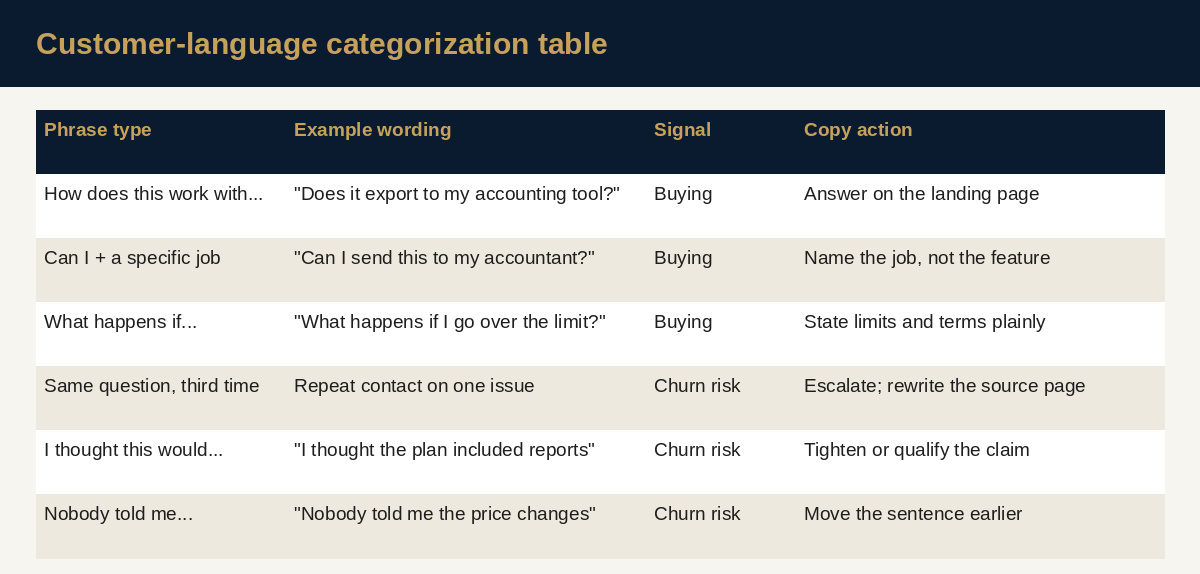
After years of reading queues, certain phrases show up so reliably before a purchase or a cancellation that my team treats them as signals.
I want to be precise about the status of these patterns: they are qualitative, built from reading thousands of conversations and watching what the same customers did next.
They are not the output of a statistical model, and I would not quote them as probabilities. But they have held up across very different queues, from live chat at 10,000 conversations a day to e-commerce support at 300+ tickets a week, and they are specific enough to act on.
Buyer signals:
1. "How does this work with..."
A customer asking about integrations, exports, or their existing tools is not browsing. They are fitting your product into a workflow they already have, which is what people do right before they pay.
If your landing page does not answer the top three "how does this work with" questions, your best prospects are leaving to find the answer in a ticket, or not finding it at all.
2. "Can I..." followed by a specific job
"Can I export this as a CSV for my accountant?" is a buying question wearing a support costume.
The customer has already decided the job matters; they are checking whether you do it. Pages that list features in the abstract ("powerful reporting") lose these customers.
Pages that name the job ("export any report as CSV, PDF, or straight to your accounting tool") keep them.
3. "What happens if..."
Questions about limits, billing, cancellation, and data are risk questions, and risk questions come from people close to a decision.
Silence on these points does not make the risk go away; it makes the customer assume the worst. The teams that answer "what happens if" on the page, in plain language, keep the careful buyers everyone else scares off.
Churn signals:
1. The same question, third time
A customer who asks once is learning. A customer who asks the same thing three times is telling you the answer never landed. In our queues, a fourth contact on the same issue is usually where the conversation turns from problem-solving to cancellation or a chargeback threat. I state that as an observed pattern, not a measured rate: we did not run a study on it, but any agent who has worked a queue will recognise it, and it is why we treat a third repeat as an escalation trigger rather than a routine ticket.
2. "I thought this would..."
Every "I thought" ticket is a copy failure upstream. The customer bought a promise the page made loosely, and the product keeps differently.
Collect these sentences. They are a precise list of the claims your copy needs to tighten, qualify, or drop.
3. "Nobody told me..."
Charges, limits, and changes that customers discover instead of being told about generate the angriest tickets we handle, and anger is what turns a fixable problem into a public review.
The fix is almost never operational. It is one honest sentence, moved earlier: into the pricing page, the checkout, or the first onboarding email.
Notice what these six phrases have in common: none of them are about your product's features. They are about the customer's job, risk, and expectations. That is why copy written from a feature list misses them, and why the support queue, which hears about jobs, risks, and expectations all day, does not.
The weekly routine: from ticket language to page copy
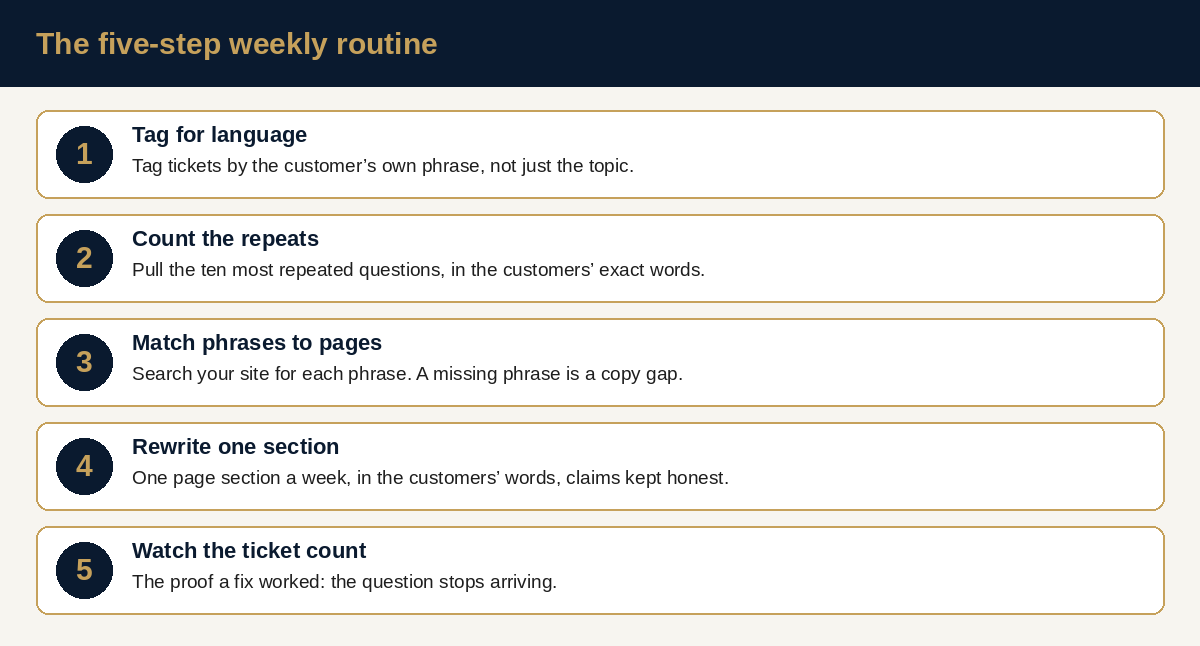
Insight without a routine dies in a spreadsheet. This is the routine we run, which fits inside an hour a week and sits alongside the automated reporting that already saves my team more than 20 hours a week on manual number-pulling.
Step 1: Tag for language, not just topic
Most teams tag tickets by subject (billing, bug, how-to). Add one more tag layer: the customer's own phrase.
When a ticket contains a "can I", an "I thought", or a "how does this work with", tag it with the phrase type. After a month, you have a phrase library sorted by intent.
Step 2: Count the repeats
Every week, pull the ten most repeated questions. For each one, write down the exact words customers used most often. Not your summary of their words; their words. If 30 people asked where the export button is and 25 of them called it "download my data", then "download my data" is the phrase your product and your pages should use.
Step 3: Match phrases to pages
Take the top phrases and search your own site for them. Where the customer's phrase does not appear on the page that should answer it, you have found a copy gap with a ticket count attached. This is a far better prioritisation tool than opinion: fix the gap with 200 tickets behind it before the one with four.
Step 4: Rewrite one page section a week
Not the whole site. One section: the pricing page's limits paragraph, the onboarding email's second message, the help article nobody finds. Use the customers' words, keep the claim honest, and ship it. One section a week is 50 improvements a year, each one sourced from real demand.
Step 5: Watch the ticket count, not just the conversion rate
The cleanest proof that a copy change worked is that the question stops arriving. We track repeat-question volume the same way we track resolution rates.
Here is the routine running on a real week, from the e-commerce support operation I run alongside the main team (300+ tickets a week).
Step 1 tagging showed the usual spread, but Step 2 counting surfaced one theme far above the rest: customers asking about product details that were, in principle, on the product page: sizing, compatibility, what was in the box, whether an item worked with something they already owned.
Step 3 matched those phrases against the store's pages and found the pattern: the information existed, but it was written in the seller's vocabulary, buried under marketing copy, or missing from the listing entirely on some channels.
The same review, run across the catalog, is part of how a cleanup project on that store worked through 12,000 SKUs and how we diagnosed and fixed 20+ Google Merchant Center errors: the tickets told us which listings were wrong before any dashboard did.
Step 4 rewrote the top product pages' detail sections in the customers' own phrasing and moved the answers above the fold.
Step 5 is what closed the loop: the detail questions did not disappear, because a store will always get them, but they stopped being the dominant theme, and agents stopped spending their week answering questions a page should have answered.
That shift, repeated week after week across both operations, is also the honest context for our headline numbers.
First-contact resolution rose 25% and average handle time fell 18% during the period in which the team scaled from 30 to 200+ agents.
Those gains did not come from one change.
They came from the combination this article describes: SOPs and training for the agents, a handover routine that carries context so customers never repeat themselves, automated reporting, and page fixes that stopped avoidable questions at the source.
I would rather give you that full picture than pretend a headline rewrite did it alone.
Before and after: one paragraph, rewritten from tickets
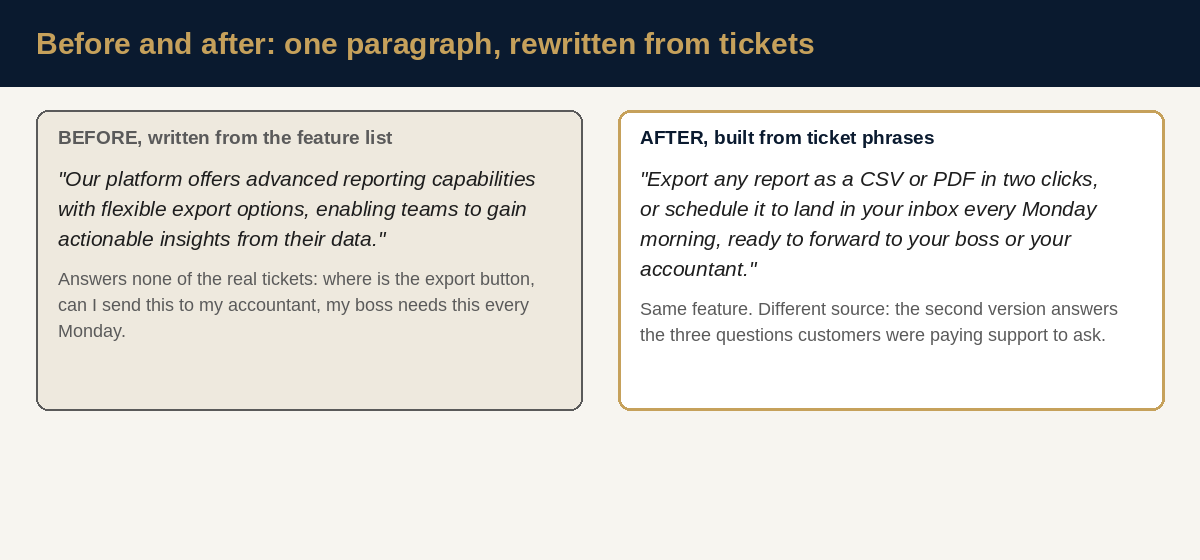
Here is the pattern in miniature, from the kind of paragraph every SaaS site has. The original, written from the feature list:
"Our platform offers advanced reporting capabilities with flexible export options, enabling teams to gain actionable insights from their data."
Nothing in that sentence is false, and nothing in it answers a single real ticket.
The tickets said: "where is the export button", "can I send this to my accountant", "my boss needs this every Monday". The rewrite, built from those phrases:
"Export any report as a CSV or PDF in two clicks, or schedule it to land in your inbox every Monday morning, ready to forward to your boss or your accountant."
Same feature. Different source. The first version describes the product; the second answers the three questions customers were actually paying support to ask.
Multiply that one paragraph by every section of a pricing page, an onboarding sequence, and a help centre, and you have the difference between copy that sounds professional and copy that does the job the customer came for.
What this method will not do
Honesty about limits is part of the method, so three of them belong on the record. First, ticket language fixes clarity problems, not product problems.
If customers keep writing because a feature genuinely does not exist or a parcel genuinely is lost, no paragraph will save you; the queue is then a product backlog, and it should be read as one.
Second, the loudest phrase is not always the most valuable one.
A confusing error message can generate more tickets than a pricing gap that quietly costs ten times the revenue, which is why Step 3 ranks by count and by what the question is about, not by count alone.
Third, this method reads the customers who write to you. It says nothing about the ones who read the page, understood it perfectly, and left anyway.
For them you still need the tests, the analytics, and the judgement calls. What the inbox gives you is the half of the evidence those tools cannot collect: the customer's own words, at the moment the words on your page failed them.
The point
Your support inbox is not a cost centre with a writing problem. It is a research department that interviews your customers every day, in their own words, at the moment of maximum honesty, and files the transcripts where nobody reads them. A team handling thousands of conversations a day is sitting on the largest copy-testing panel in the company.
Start small. This week, read 50 tickets and write down the exact phrases. Search your site for them. Fix the first gap you find. The queue will tell you if it worked, because the question will stop arriving, and a question that stops arriving is a customer who found the answer on the page and stayed.
Latest posts
View all posts →
Why Small Business Re-Engagement Emails Fail (And the 3 Fixes That Actually Work)
You put together a re-engagement campaign. The subject line is solid. The offer is genuine. You send it to 800 subscribers who've gone quiet over the past few…


AI Chatbots + SEO: A Practical Guide for Growing Businesses (2026)
Most growing businesses treat their chatbot and their SEO as two separate jobs. The chatbot answers customers. The SEO brings visitors. They sit in different t…

How to Improve a B2B Landing Page When Traffic Is Too Low for A/B Tests
Most advice on landing pages ends with the same instruction: test it. Split your traffic, run version A against version B, and keep the winner. For a B2B compa…