You don’t need a $300/month subscription to get solid SEO results. I’ve seen it firsthand.
Some of the best SEO tools under 50 bucks can cover way more than people expect, especially if you know how to use them right.
Here’s the thing. More and more small businesses are putting money into SEO, but that doesn’t mean they’re all going after expensive platforms. In fact, 49% are already investing in SEO, and another 31% are planning to start soon.
That shift is real. But budgets are still tight.
I’ve tested a lot of low-cost tools over the years. And yes, most of them don’t live up to the hype. You get nice-looking dashboards, but the data feels off or just not useful.
So I put this guide together to show you the budget tools I keep coming back to. Let’s meet them, shall we?
Why Expensive SEO Tools Aren’t Always Better
Here’s something I wish someone told me earlier. Paying more doesn’t mean you’ll get better SEO results.
I used to think I needed the most advanced tool out there. More features, more reports, more data.
But most of that just sat there unused. Or worse, it made things more confusing.
And it’s not just me:
- 61% of SMBs rely on free or freemium SEO tools instead of full paid subscriptions, as reported by Digital World Institute.
- Per the same source, 67% of SMBs say pricing is the main factor when choosing an SEO platform.
- Free SEO tools can handle around 80% of what most small businesses actually need, while paid tools cover the advanced 20%.
- 41% of marketers say limited budget is their biggest barrier when measuring content performance.
So yes, there’s a pattern here.
Most people don’t need an all-in-one platform. They need a solid SEO tool that gives them reliable keyword data, clear keyword ideas, and simple rank tracking they can actually use.
That’s what gets results.
Now, to be fair, cheaper tools do have limits. If you’re running large sites or need deep analysis at scale, you’ll feel those gaps pretty quickly.
But for most small business use cases? You can cover a lot without spending hundreds every month.
You just need the right setup.
Meet the Top 6 SEO Tools Under $50 in 2026
So what should you actually use?
After testing a bunch of options (and wasting money on a few that looked better than they were), I narrowed it down to the tools that consistently deliver:
#1. Pikera SEO: The Game Changer for Keyword Strategy
Let me tell you about Pikera SEO.
You can give it your targeted keyword (you’d want to rank for).
It analyzes what’s currently ranking for that keyword. Then it tells you exactly what it would take for your website to rank there, too.
Pikera SEO tells you things like how many backlinks you need, the estimated DA score required, how long it might take for your site to rank higher, technical issues to fix, and what content actually helps you rank higher.
❓What makes it different:
- Tells you how many backlinks you’d need to rank for your targeted keyword.
- Shows realistic timelines for when you’ll rank.
- Points out website problems that might hurt your rankings.
- Explains what type of content actually works.
✅ It is perfect for:
- Knowing if a keyword is worth your time.
- Getting clear steps instead of confusing data.
- Understanding realistic ranking timelines.
- Creating content that actually ranks.
How Pikera SEO Works:
Think of it like Google saying, “Hey, if you want your content to show up when someone searches for this keyword, here’s exactly what you need.“
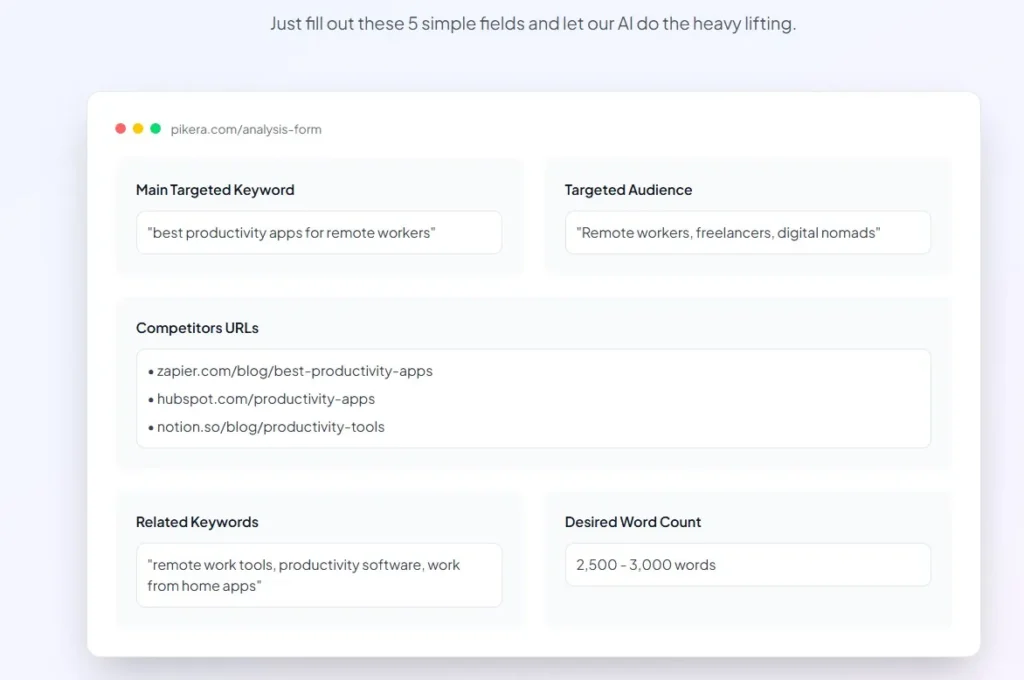
What you put in:
You type your target keyword, like “best productivity apps for remote workers.”
What you get back:
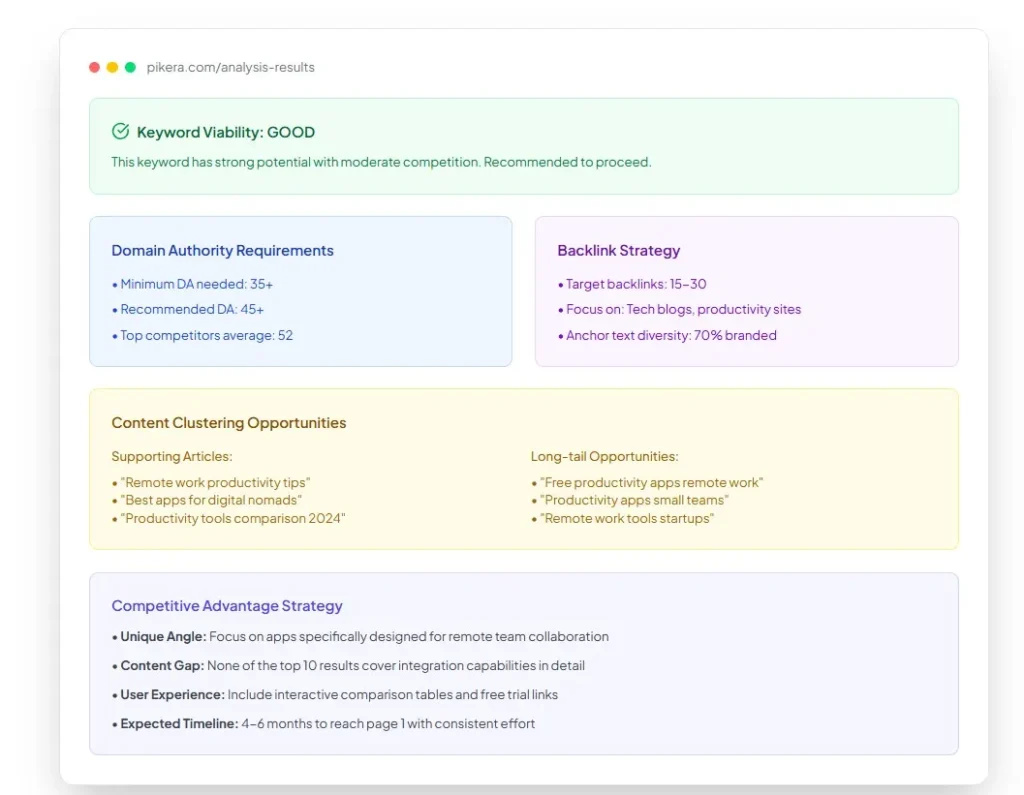
• You need 25 backlinks from websites with good authority
• Your website needs a domain authority of 35 or higher
• It’ll probably take about 4 months to rank
• Your content should focus on remote team collaboration features
• Your website should load in under 3 seconds
A quick demonstration video:
Clearly, no more “it depends” answers. Just clear requirements.
Right now, Pikera SEO is in early access with a waitlist at https://pikeraai.com/waitlist. You also can see more about how it works.
#2. Ubersuggest: Keyword Research on a Budget
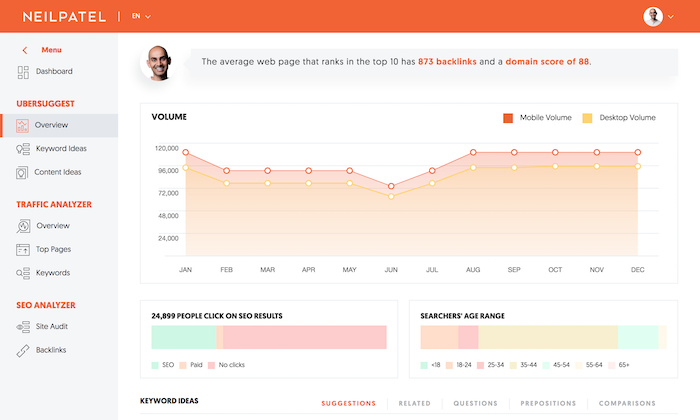
Neil Patel’s Ubersuggest is probably the most popular SEO tool under $50. At $29 monthly, it gives you solid keyword research without the crazy price tag.
I’ve used it quite a bit, especially when I just need quick keyword ideas or a fast look at what competitors are doing. It’s not trying to do everything. It focuses on the essentials and keeps things simple, which honestly makes it easier to use consistently.
❓What it does well:
- Shows search volume and keyword difficulty
- Basic competitor keyword analysis
- Content ideas based on top-performing posts
- Simple rank tracking features
- Domain overview with organic traffic estimates
✅ Best for these situations:
- You’re just starting with SEO and need basic data
- Keyword research for blog content planning
- Checking what keywords competitors rank for
- Getting content ideas that might actually work
Real example: A local bakery used Ubersuggest to find “custom birthday cakes [city name]” instead of just “birthday cakes.” The local keyword had way less competition and brought in actual customers.
#3. KWFinder: Long Tail Keyword Discovery
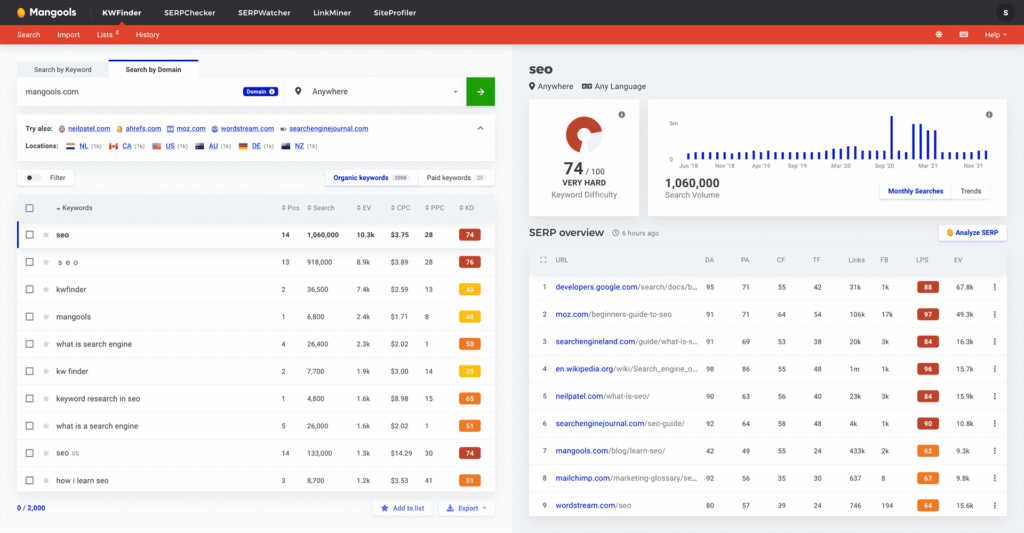
KWFinder by Mangools costs around $49 monthly, but it’s honestly one of the best tools for finding those hidden gem keywords that bigger sites ignore.
❓Why it’s different:
- Focuses specifically on long tail keywords
- Shows actual difficulty scores that make sense
- Great for finding location-based keywords
- Clean interface that doesn’t overwhelm you
✅ Perfect for:
- Finding keywords with 100 to 1000 searches
- Local businesses targeting specific areas
- Content creators who need topic ideas
- Anyone tired of fighting impossible competition
Mini case study: An online fitness coach found “home workouts for busy moms” using KWFinder. The keyword had 800 searches monthly, but low competition. She ranked #2 within 4 months and now gets 50+ leads monthly from that single post.
#4. AnswerThePublic: Free Question Keyword Generator
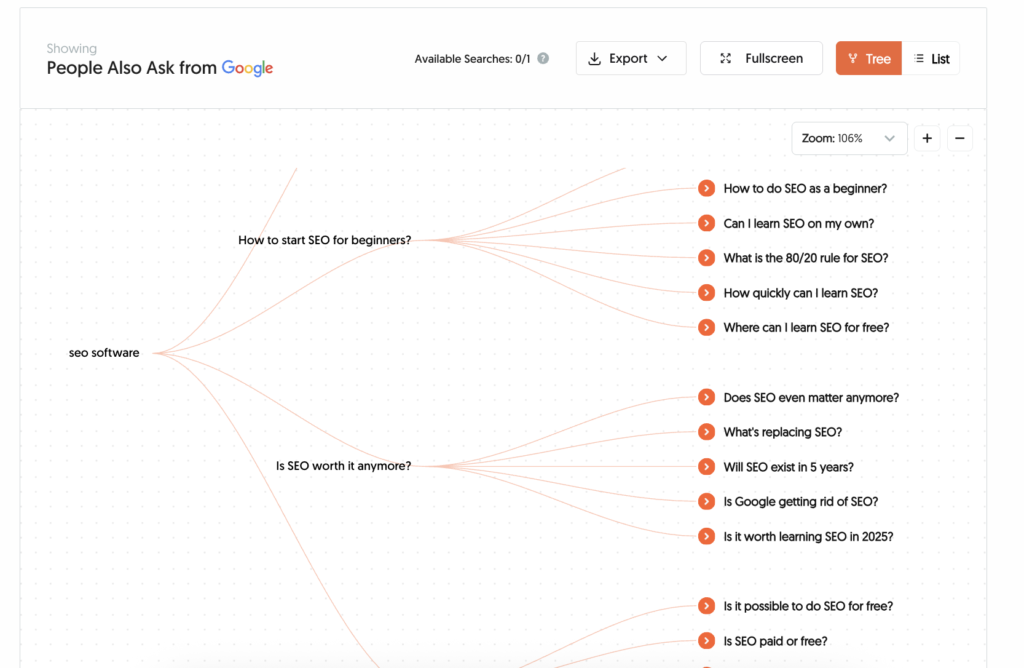
This one’s actually free, but it’s so useful I had to include it. AnswerThePublic shows you exactly what questions people ask about your topics.
❓How it helps:
- Finds question-based keywords naturally
- Shows “people also ask” type queries
- Great for content ideas that answer real questions
- Helps you understand search intent better
✅ Best use cases:
- Creating FAQ sections that might rank
- Finding blog post topics with clear search intent
- Understanding what your audience actually wants to know
- Building content around real customer questions
Quick tip: Combine this with other tools. Use AnswerThePublic for ideas, then check difficulty with KWFinder or Ubersuggest.
#5. SE Ranking: All in One Under $50
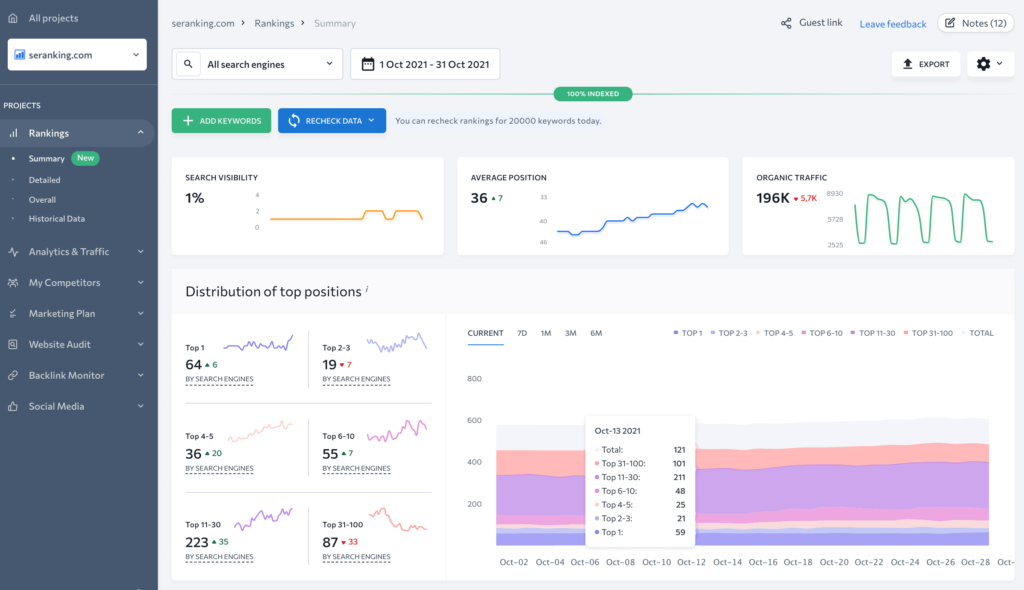
SE Ranking offers plans starting at $44 monthly and gives you almost everything you need in one place. It’s honestly one of the most complete SEO tools under $50.
If you don’t want to jump between multiple platforms, this is a solid option. You get a full SEO toolkit in a single dashboard, which makes it easier to stay organized and keep track of your work.
❓What you get:
- Keyword research and difficulty analysis
- Rank tracking for unlimited keywords
- Website audit that finds technical issues
- Competitor analysis and backlink checking
- Content optimization suggestions
✅ Perfect for:
- Small agencies managing multiple clients
- Businesses that want everything in one tool
- People who hate switching between different platforms
- Anyone doing serious SEO on a budget
#6. Google Search Console: The Free Essential
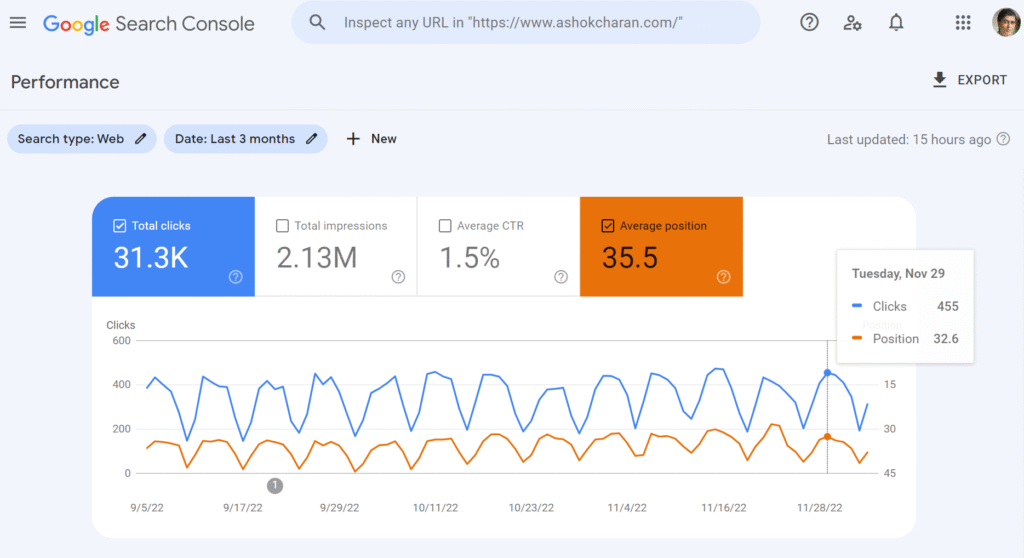
I know it’s free, but Search Console is honestly more valuable than most paid tools. It shows you exactly what Google thinks about your website.
I check it every week without fail. The data comes directly from Google, so you’re seeing what’s happening with your pages, your rankings, and your clicks.
❓Why it’s essential:
- Shows which keywords you already rank for
- Tells you which pages get the most clicks
- Reveals technical issues Google found
- Tracks your ranking improvements over time
✅ How to use it effectively:
- Check weekly for new ranking keywords
- Fix any coverage issues it reports
- Use it to find content that’s almost ranking (positions 11-20)
- Track click-through rates and improve titles
Pro tip: Use Search Console data to find keywords you rank on page 2 for. These are usually the easiest wins for improving traffic.
How to Combine These Tools for Maximum Value
Here’s where most people get it wrong.
They try to find one tool that does everything. That usually ends in overpaying or underusing what they bought.
What’s worked better for me is keeping things simple. Instead of relying on a single platform, I combine a few tools that each do one thing well. It’s cheaper, more flexible, and you actually use what you’re paying for.
Here’s how I’d set it up depending on where you’re at:
My recommended combinations:
For beginners (under $30 monthly):
If you’re just getting started, you don’t need anything complex. You need ideas, basic keyword research, and a way to see what’s working. So, you can use:
- AnswerThePublic (free) for ideas
- Ubersuggest ($29) for research and tracking
- Google Search Console (free) for monitoring
For serious SEO (under $50 monthly):
Once you’re more consistent with content, you need better insights and more precise keyword targeting. Here’s my recommended stack:
- Pikera SEO for keyword strategy and ranking insights
- KWFinder ($49) for long tail research
- Google Search Console (free) for performance tracking
For agencies (under $50 per client):
If you’re handling multiple clients, things shift. You need organization, reporting, and something scalable. So, you can use:
- SE Ranking ($44) for client management
- Google Search Console (free) for each client
- AnswerThePublic (free) for content ideas
What to Avoid in Cheap SEO Tools
Not every tool under $50 is a good deal.
Some look great on the surface, but once you start using them, the cracks show pretty fast. Bad data, clunky interfaces, or features that don’t really help you move forward.
Over time, I’ve learned to spot these early.
Tools that are probably useless
If you run into tools like these, it’s usually not worth your time or money.
- Promise instant rankings or guaranteed results
- Only focus on keyword density checking
- Don’t show actual search volume data
- Have interfaces that look like they’re from 2010
- Don’t provide actionable insights, just data dumps
Questions to ask before buying
Before paying for anything, I always run through a quick checklist:
- Does this tool solve a specific problem I have?
- Can I take action based on the data it provides?
- Is the interface actually easy to use?
- Do they offer a free trial so I can test it?
Making the Most of Budget SEO Tools
Getting access to tools is the easy part.
Getting results from them? That’s where most people fall short.
I’ve seen people spend hours inside tools, jumping from one report to another, and still not publish anything. That’s the trap.
The real value comes from what you do with the data:
Focus on execution, not data collection
It’s tempting to keep researching, but results come from taking action on what you already know.
- Pick 3-5 keywords and go deep instead of researching 100
- Actually create the content your tools suggest
- Track rankings monthly, not daily
- Use insights to improve existing content
Don’t get trapped in analysis paralysis
More data doesn’t automatically mean better decisions. At some point, you just need to move.
- Spend 20% of time on research, 80% on execution
- Set limits on how long you spend on tools
- Focus on keywords you can actually rank for
- Remember that perfect data doesn’t guarantee results
Real-World Results with Budget Tools
It’s easy to talk about tools. It’s different when you see what happens when people actually use them right.
These aren’t edge cases or huge brands with big budgets. These are simple setups, clear keyword choices, and consistent execution using tools under $50.
Here are a few real examples:
🍱 Local restaurant client:
- Used KWFinder to find “best pizza [neighborhood]”
- Targeted 5 local keywords instead of impossible ones
- Ranked #1 for 3 keywords within 6 months
- Increased online orders by 40%
🔗 B2B SaaS startup:
- Used Pikera SEO to understand ranking requirements
- Focused on keywords they could realistically rank for
- Created content based on actual search intent
- Went from 500 to 5000 monthly organic visitors
💻 Freelance designer:
- Combined AnswerThePublic with Ubersuggest
- Found “logo design for [specific industries]” keywords
- Created service pages for each industry
- Doubled client inquiries in 4 months
And if you look closely, there’s a clear pattern.
They didn’t chase high-volume keywords or rely on more data. Instead of that, they picked realistic opportunities and followed through.
When to Upgrade to Expensive Tools
At some point, budget tools can start to feel limiting. Not because they stop working, but because your needs change.
More projects, data, and coordination. That’s when upgrading starts to make sense. But jumping too early is a mistake I see all the time.
Here’s a simple way to think about it:
Upgrade if you:
- Manage 10+ websites or clients
- Need advanced competitor analysis daily
- Have a team that needs collaboration features
- Process thousands of keywords regularly
- Need custom reporting for clients
Don’t upgrade if you:
- Still have basic technical issues to fix
- Haven’t maxed out your current tools
- Aren’t consistently creating content yet
- Don’t have processes for acting on data
Ready to Take the Next Step?
If you’re trying to find the best SEO tools under 50 bucks, start simple. Don’t try to fix everything at once. Pick the one thing that’s holding you back and solve that first.
Here’s how I’d approach it:
- Need a clearer keyword strategy? Try Pikera SEO and get a realistic view of what it takes to rank.
- Want a solid all-around SEO tool? Ubersuggest covers the basics without overcomplicating things.
- Looking for long-tail opportunities? KWFinder is great for finding keywords you can actually compete for.
- Prefer an all-in-one setup? SE Ranking gives you more control in one place.
Now, don’t overthink this part. Just get moving.
Here’s your action plan for this week:
- Pick one tool that solves your biggest SEO problem.
- Start with their free version or trial.
- Focus on finding 5-10 realistic keywords to target.
- Create content based on those keywords.
That’s it.
I’ve seen this play out again and again. A simple setup, used consistently, beats having access to more data than you know what to do with.
You don’t need perfect data to move forward. What you should have is clarity, consistency, and a plan you’ll actually follow.
FAQs
What are the best SEO tools under $50/month for a small business?
If you want a simple setup, I’d go with Ubersuggest as your main keyword research tool, Google Search Console for data directly from Google, and maybe AnswerThePublic for extra keyword ideas. If you need something more complete, SE Ranking is a solid option under $50.
Are cheap SEO tools actually effective for improving rankings?
Yes, if you use them right. Most small business websites don’t need advanced features. A good affordable SEO tool can handle keyword research, basic rank tracking, and content planning without any issue.
What features should I look for in an affordable SEO tool?
Focus on the basics: reliable keyword data, keyword difficulty scores, rank tracking, and competitor insights. If a tool does these well, you’re covered for most use cases.
Can I do proper keyword research with tools under $50?
You can. Tools like Ubersuggest, KWFinder, or even Google Keyword Planner give you enough keyword data to find real opportunities. The key is picking keywords you can actually rank for, not just high-volume ones.
What’s the difference between free SEO tools and paid ones?
Free tools usually cover the essentials. Paid tools add more depth, more data, and better scaling. But for most people, free SEO tools plus one paid tool are more than enough.
Do I need other tools besides SEO platforms to understand performance?
It helps. If you pair your SEO tools with Google Analytics, you’ll see how users behave after they land on your site. And if you’re running campaigns, data from Google Ads can give you extra context on search trends and keyword performance.