
Why Scheduling and Analytics Matter for Social Media Marketers Today
Social media marketers today need tools that give them a unified dashboard and the ability to schedule content ahead of time.
Managing multiple platforms is now the norm, and each one comes with its own formats and posting requirements.
Most brands are active on several platforms, so the workload adds up quickly.
Trying to keep up manually can feel like a full-time job because you’re producing Reels, TikToks, static posts, carousels, Shorts, and links all at once.
Algorithms reward consistency and data-driven decisions, which means you need a tool that handles both analytics and publishing in one place.
Strong analytics help you understand what formats work best and when your audience is most active, which makes your scheduling even more effective.
In this guide, you’ll see the top platforms, what they offer, and who each one is best for.
Let’s dive in!
At a Glance: The Top 10 Tools Compared
Here’s a quick snapshot of the top scheduling and analytics tools so you can compare features at a glance.
| Tool | Scheduling Features | Analytics Features | Best For | Price Range |
| Buffer | Unlimited posts, drafts, first comment support | Basic analytics; advanced analytics on paid plans | Solo marketers and small teams | $0 to ~$10 per channel/month |
| Hootsuite | Multi platform posting, drag and drop calendar, high scheduling capacity | Cross platform analytics, best time to post, reporting | Professionals managing multiple platforms | ~$99/month and up |
| Later | Visual planner, multi platform scheduling, up to 180 posts/profile | Platform insights, analytics history, competitor benchmarking | Creators and visual brands | $0 to ~$80/month |
| Sprout Social | Cross platform scheduling, queues, team workflows | Advanced analytics, competitor data, tag insights | Agencies and mid to large teams | ~$199 to ~$399/user/month |
| Metricool | Unlimited scheduling, bulk upload, multi brand management | Full analytics history, competitor tracking, downloadable reports | Freelancers, small teams, budget focused agencies | $0 to ~$45/month |
| SocialPilot | Multi platform scheduling, content calendar, client approvals | Performance analytics, reporting dashboard | Agencies and freelancers | ~$25 to ~$170/month |
| Agorapulse | Multi profile scheduling, inbox management, queue categories | Competitor analysis, brand sentiment, best time to post | Social media managers and agencies | ~$70 to ~$150/user/month |
| Loomly | Content calendar, post ideas, cross platform scheduling | Performance tracking, exportable reports | Small teams and creators | ~$32 to ~$175/month |
| Sendible | Scheduling, queueing, bulk uploads, client workflows | Reporting dashboards, UTM tracking, monitoring | Agencies managing multiple clients | ~$29 to ~$170/month |
| HubSpot Social Tools | Scheduling integrated with CRM and marketing tools | Social, website, and lead analytics, unified dashboards | Brands using the HubSpot ecosystem | ~$20 to $800+/month |
The 10 Smart Scheduling and Analytics Tools
Buffer
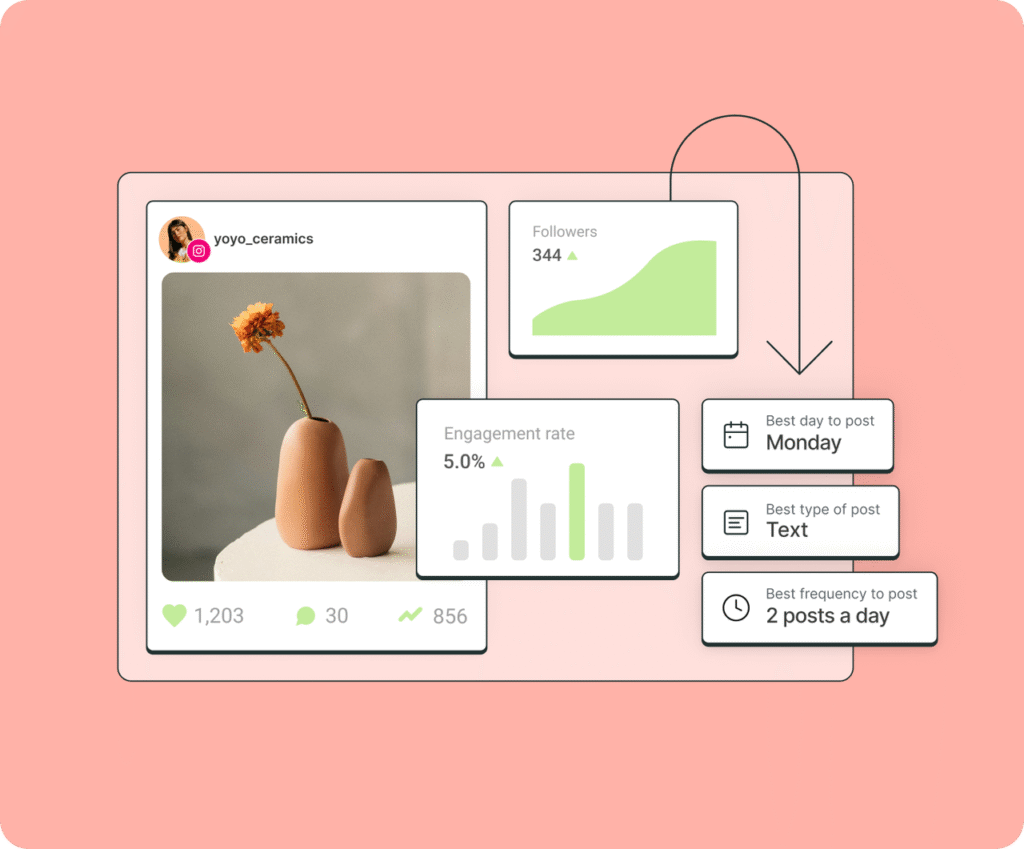
Buffer is one of the simplest social media scheduling tools available, and it’s built for small teams and solo marketers who want a clean dashboard without extra complexity.
Key Scheduling Features
- Schedule unlimited posts per channel on paid plans.
- Draft posts and save ideas for later.
- Add a first comment to Instagram posts.
- Use the content calendar to see your week or month at a glance.
- Create hashtag groups you can reuse across posts.
Analytics Features
- Track post performance and engagement trends.
- See analytics by platform, post type, and time frame.
- Use the best time to post recommendations on paid plans.
- Compare performance across date ranges to understand what worked.
Pros
- Easy for beginners.
- Clean interface.
- Strong mobile app.
- Affordable even for freelancers.
Cons
- Advanced analytics require an upgrade.
- Collaboration features are limited compared to tools built for agencies.
Best For
Solo marketers and small teams who want a simple scheduler with basic analytics.
Price Range
Free to ~$10 per channel per month.
How a Marketer Would Use It in a Weekly Workflow
- You plan a full week of posts on Sunday.
- Upload your assets, write captions, and save hashtag groups for each platform.
- Schedule everything using the best time to post suggestions.
- Use current social media trends for ideas when planning new content.
Hootsuite

Hootsuite is a full social media management platform built for professionals and teams who need to manage multiple channels, track detailed analytics, and streamline their publishing workflow in one place.
Key Scheduling Features
- High scheduling capacity on many plans.
- Drag and drop content calendar for planning ahead.
- Bulk upload for large batches of posts.
- Queueing and the best time to post suggestions.
- Schedule content across all major social networks.
Analytics Features
- Cross-platform analytics covering all major social networks.
- Best time to post recommendations.
- Competitor benchmarking on higher-tier plans.
- Custom reports that can be exported and shared with clients or teams.
- Social listening and sentiment insights for brand monitoring.
Pros
- Strong all-in-one dashboard for large content workloads.
- Deep analytics and reporting tools.
- Built-in workflows for teams and approvals.
- Reliable platform with a long track record.
Cons
- Pricing increases quickly as you add users or profiles.
- It can feel complex for smaller teams.
- Some advanced analytics are locked behind higher-priced plans.
Best For
Professionals and businesses managing multiple platforms who need publishing, analytics, and team workflows in one tool.
Price Range
Starts around $99 per month and increases with additional features, profiles, and users.
How a Marketer Would Use It in a Weekly Workflow
- Upload a full week of content into the planner.
- Arrange everything using the drag-and-drop calendar.
- Schedule posts using recommended posting times.
- Monitor real-time performance throughout the week.
- Export a clean report at the end of the week and compare results against competitors to plan next week.
Later
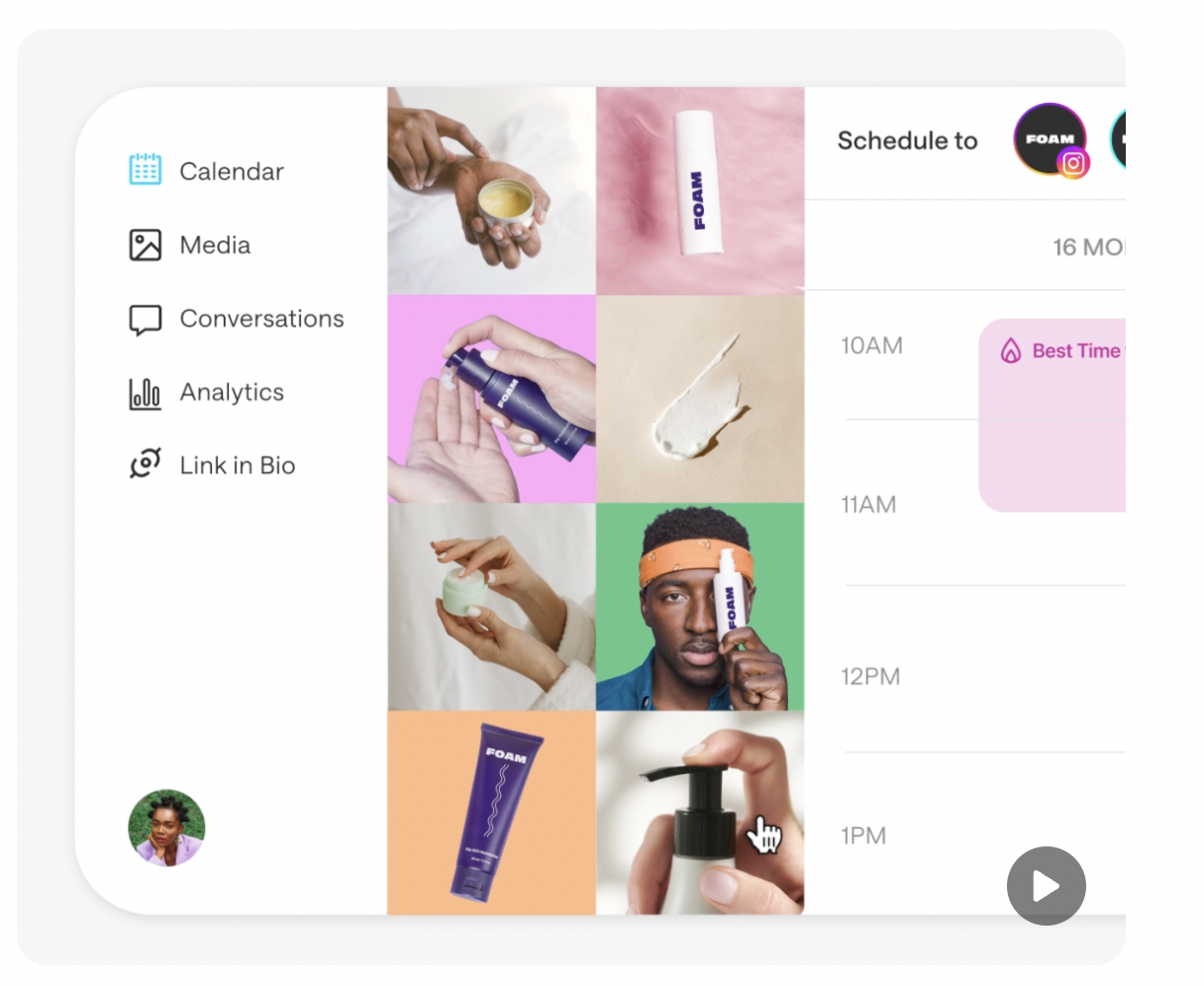
Later is a visual-first scheduling platform built for creators, small teams, and brands that rely heavily on Instagram, TikTok, and other visual content formats.
Its drag-and-drop planner makes it easy to map out posts for the week or month.
Key Scheduling Features
- Visual content calendar for planning posts.
- Multi-platform scheduling for Instagram, TikTok, Pinterest, LinkedIn, and more.
- Auto-publish for most platforms.
- Ability to save caption templates and hashtag groups.
- Link in bio tool for driving traffic from Instagram and TikTok.
Analytics Features
- Platform analytics with historical data based on the plan level.
- Performance insights for Instagram, TikTok, and Pinterest.
- Audience analytics to understand growth and engagement.
- Competitive benchmarking on higher-tier plans.
Pros
- Easy visual layout that helps you plan content quickly.
- Great for creators and brands focused on visual platforms.
- Strong mobile app for posting on the go.
Cons
- Some analytics features require higher-tier plans.
- Not as strong for teams or agencies managing many clients.
Best For
Creators, influencers, and visual brands that are posting frequently to Instagram, TikTok, and Pinterest.
Price Range
Free to around $80 per month, depending on the plan.
How a Marketer Would Use It in a Weekly Workflow
- Upload all your video and image assets for the week.
- Drag and drop posts into the visual calendar to build your layout.
- Add captions, hashtags, and save your templates for reuse.
- Schedule posts at your best times and let auto-publish handle posting.
- Review analytics at the end of the week to adjust next week’s visuals and timing.
Sprout Social
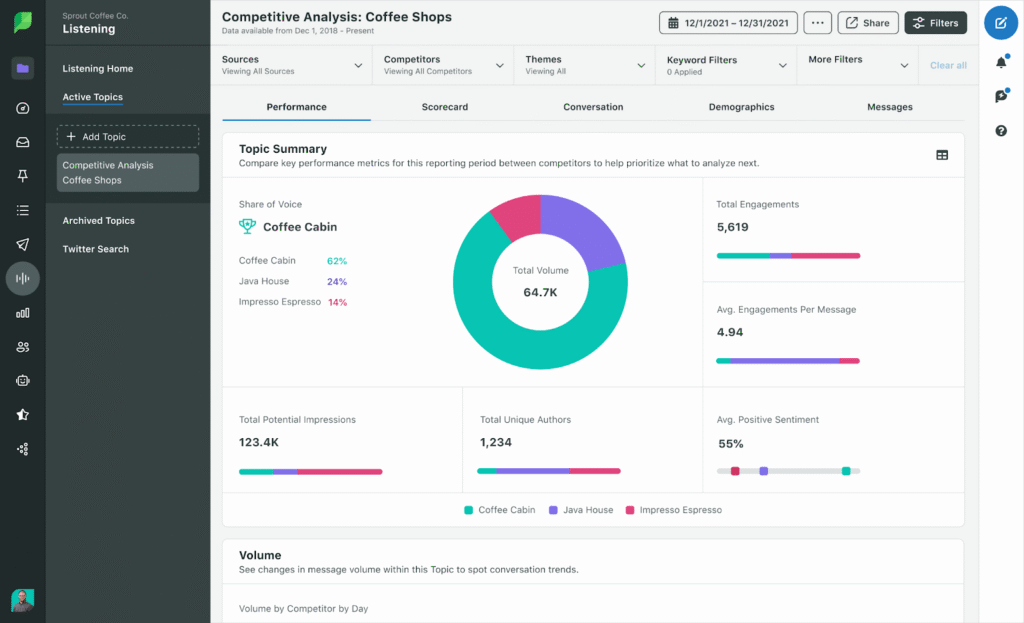
Sprout Social is a premium social media management platform designed for teams and agencies that need advanced analytics, collaboration tools, and full-scale publishing workflows. It is one of the most robust all-in-one options available.
Key Scheduling Features
- Cross-platform scheduling for all major networks.
- Drafts, queues, and approval workflows for teams.
- Shared content calendar for full visibility across campaigns.
- Asset library to store brand visuals and copy.
- Tools for planning, tagging, and organizing large content batches.
Analytics Features
- Advanced profile and post-level analytics.
- Competitor analysis and industry benchmarking.
- Tag reporting for tracking campaigns across multiple platforms.
- Customizable reports that can be exported for clients or leadership.
- Listening and sentiment insights for brand monitoring.
Pros
- One of the strongest analytics suites in the industry.
- Excellent collaboration features for teams.
- Reliable and scalable for large workloads.
- Professional reporting tools that save time for agencies.
Cons
- Higher priced than most alternatives.
- Overkill for freelancers or very small teams.
Best For
Agencies and mid to large teams that need powerful analytics, team workflows, and high-level reporting.
Price Range
Around $199 to $399 per user per month, depending on the plan.
How a Marketer Would Use It in a Weekly Workflow
- Meet with your team to outline the week’s content in the shared calendar.
- Load assets into the library and assign posts to team members for drafting.
- Approve posts and schedule everything across multiple platforms.
- Track performance using advanced analytics and tag reports.
- Export reports at the end of the week to review results with clients or leadership.
Metricool
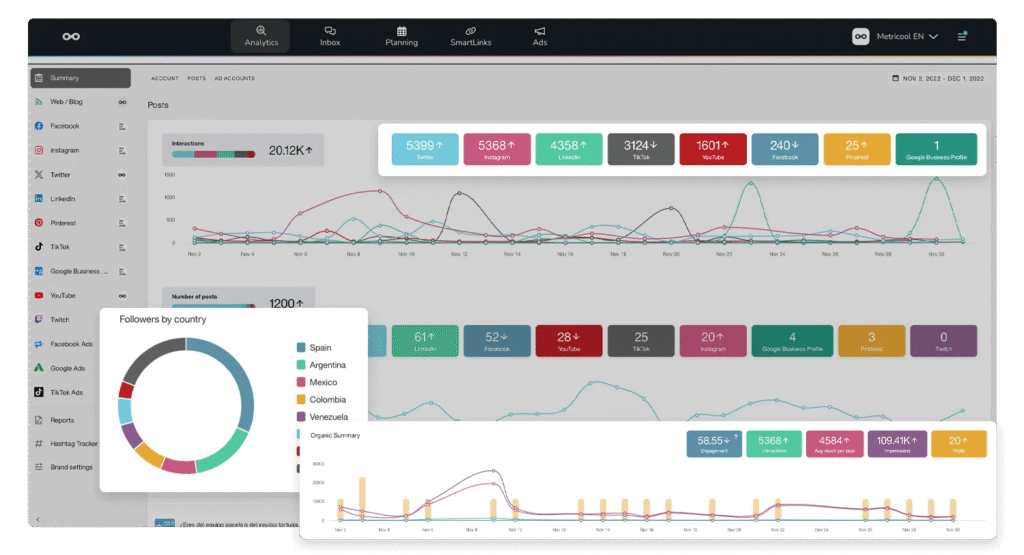
Metricool is a versatile scheduling and analytics platform built for marketers, freelancers, and agencies who want strong data insights without the high price tag. It offers a simple interface with surprisingly deep reporting features.
Key Scheduling Features
- Cross-platform scheduling for all major social networks.
- Smart calendar that shows the best times to post.
- Bulk upload options for planning large batches of content.
- Ability to manage multiple brands from one dashboard.
- Drafting and organizing tools for teams or solo planners.
Analytics Features
- Full analytics history with detailed performance breakdowns.
- Competitor tracking to benchmark your content.
- Web analytics integration for tracking traffic and user behavior.
- Customizable reports that can be downloaded and shared.
- Real-time metrics for all connected platforms.
Pros
- Very strong analytics for the price.
- Easy to use, even for beginners.
- Great for managing multiple brands.
- Clean dashboards that make data easy to understand.
Cons
- Some features require add-ons for certain platforms.
- Collaboration tools are more limited than premium platforms.
Best For
Freelancers, small teams, and agencies that want powerful analytics without spending enterprise-level prices.
Price Range
Free to around $45 per month, depending on the plan.
How a Marketer Would Use It in a Weekly Workflow
- Load all content into the smart calendar to see the full posting schedule.
- Schedule posts based on the recommended posting times.
- Review competitor analytics mid-week to adjust content strategy.
- Track performance across all platforms at the end of the week.
- Export branded reports to share with clients or team members.
SocialPilot
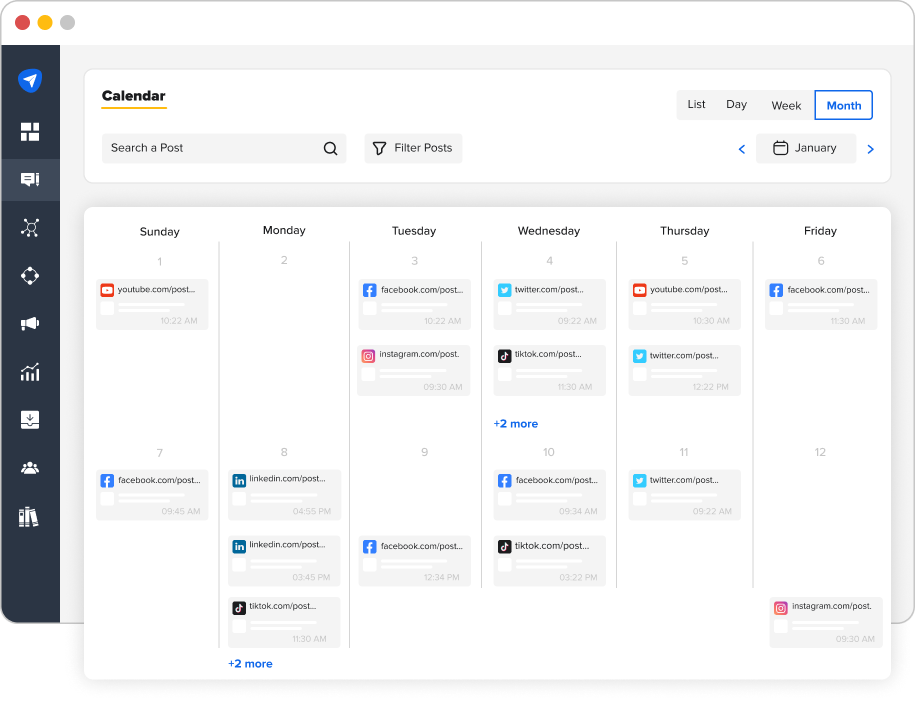
SocialPilot is a scheduling and analytics tool designed for agencies, freelancers, and teams managing multiple clients. It combines strong planning features with client collaboration tools that make it easy to manage high volumes of content.
Key Scheduling Features
- Multi-platform scheduling for all major social networks.
- Visual content calendar for planning campaigns.
- Bulk scheduling for large batches of posts.
- Client approval workflows are built directly into the platform.
- Ability to manage many accounts from one dashboard.
Analytics Features
- Post performance analytics across all connected platforms.
- Audience insights that show growth and engagement patterns.
- Reporting dashboards that can be exported or shared with clients.
- Content analytics to see what formats are performing best.
- Hashtag and posting time data to guide future posts.
Pros
- Affordable compared to most agency-level platforms.
- Strong approval workflows for managing client content.
- Easy to manage many accounts in one place.
- Clean interface that works well for teams.
Cons
- Some advanced analytics are limited compared to higher-priced tools.
- Interface is simpler, which may lack depth for data-heavy teams.
Best For
Agencies, freelancers, and small teams managing multiple brands or clients.
Price Range
Around $25 to $170 per month, depending on the plan.
How a Marketer Would Use It in a Weekly Workflow
- Upload a full week of posts for all client accounts.
- Use the content calendar to organize and adjust timing.
- Send posts to clients for approval before scheduling.
- Analyze which posts performed best across each brand.
- Export branded reports to include in weekly or monthly updates.
Agorapulse
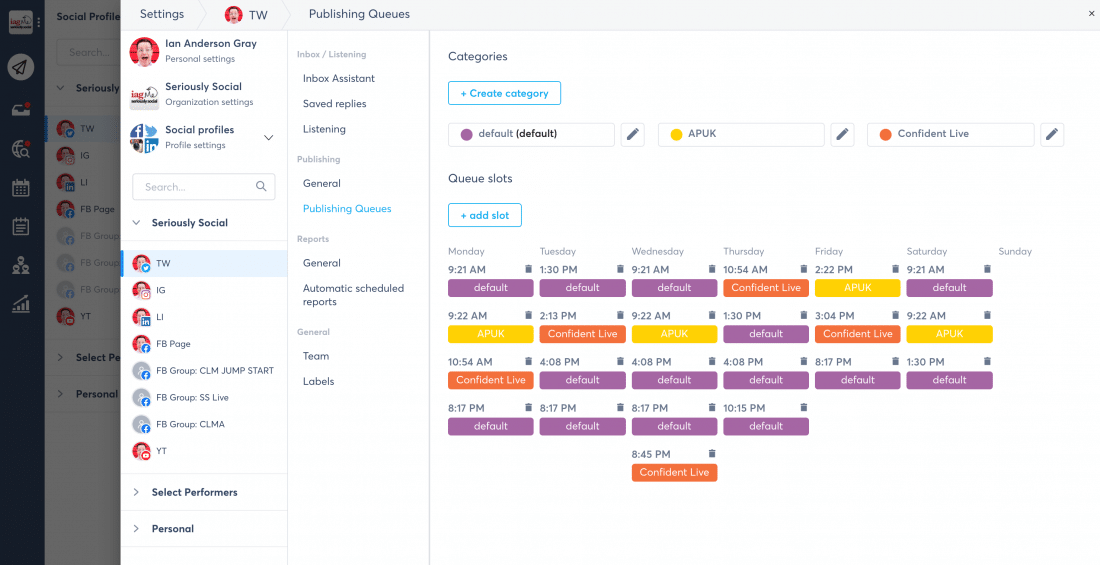
Agorapulse is a powerful social media management platform built for agencies and social media managers who need scheduling, analytics, and inbox management all in one place. It offers deep reporting and competitive insights that help teams refine their strategy.
Key Scheduling Features
- Multi-profile scheduling across all major platforms.
- Unified content calendar for full visibility.
- Queue categories to organize and recycle evergreen content.
- Bulk upload for planning large volumes quickly.
- Collaboration tools for assigning and approving posts.
Analytics Features
- Competitor benchmarking to compare your performance against similar brands.
- Brand sentiment tracking to monitor how people feel about your content.
- Best time to post recommendations.
- Detailed reporting with export options for teams or clients.
- Campaign tagging to track performance across long-term initiatives.
Pros
- Strong mix of scheduling, analytics, and inbox tools.
- Deep reporting that helps agencies justify results to clients.
- Easy to manage large account lists.
- Reliable for teams with complex workflows.
Cons
- Pricing increases with additional profiles or users.
- Some advanced analytics features are only available on higher-tier plans.
Best For
Agencies and social media managers who need strong analytics, inbox tools, and team workflows in one platform.
Price Range
Around $70 to $150 per user per month, depending on the plan.
How a Marketer Would Use It in a Weekly Workflow
- Build and schedule a full week of content inside the unified calendar.
- Use queue categories to keep evergreen content rotating.
- Check brand sentiment and competitor metrics mid-week to refine strategy.
- Monitor messages and comments across all platforms from the inbox.
- Export detailed reports for clients or leadership at the end of the week.
Loomly

Loomly is a simple and collaborative social media scheduling tool built for small teams, creators, and brands that want an easy way to plan, approve, and schedule content. Its clean interface makes it great for organizing content without the complexity of heavier platforms.
Key Scheduling Features
- Visual content calendar for planning posts across platforms.
- Built in post ideas based on trends, keywords, and best practices.
- Content library to store images, videos, and brand assets.
- Approval workflows for teams that need sign-off on posts.
- Multi-platform scheduling for major social networks.
Analytics Features
- Performance tracking for all scheduled content.
- Basic to advanced analytics, depending on the plan.
- Exportable reports for clients or internal teams.
- Engagement metrics to see what formats perform best.
Pros
- Very clean and easy to use.
- Great for small teams or creators.
- Helpful post ideas feature for planning.
- Strong collaboration tools without overcomplicating things.
Cons
- Analytics are more limited compared to enterprise tools.
- Fewer advanced features for agencies handling many clients.
Best For
Small teams, creators, and brands that want a simple scheduling and planning tool with solid collaboration features.
Price Range
Around $32 to $175 per month, depending on the plan and team size.
How a Marketer Would Use It in a Weekly Workflow
- Add all planned content to the visual calendar.
- Review and approve posts using workflows if working in a team.
- Store new assets in the content library to keep everything organized.
- Schedule posts for each platform based on audience insights.
- Review performance at the end of the week to guide new content ideas.
Sendible

Sendible is a social media management platform built for agencies and freelancers who manage many client accounts. It offers strong scheduling tools, client approval workflows, and reporting dashboards that make it easy to handle all client content in one place.
Key Scheduling Features
- Multi-platform scheduling across all major channels.
- Queueing and bulk upload for planning large volumes of content.
- Content calendar for organizing posts across clients.
- Approval workflows that make it easy to get the client’s sign-off.
- Smart scheduling suggestions to help improve post timing.
Analytics Features
- Reporting dashboards that track engagement and performance.
- UTM tracking for measuring traffic from posts.
- Monitoring tools to track mentions and keywords.
- Client-ready reports that can be customized and exported.
- Insights broken down by platform, post type, and time period.
Pros
- Designed for agencies managing many clients.
- Strong reporting features with export options.
- Easy to set up approval workflows.
- Clean and simple interface.
Cons
- Pricing increases with account volume.
- Some monitoring features are limited compared to enterprise tools.
Best For
Agencies and freelancers managing multiple client brands and needing scheduling, approvals, and reporting in one tool.
Price Range
Around $29 to $170 per month for most plans.
How a Marketer Would Use It in a Weekly Workflow
- Set up each client’s content for the week inside the calendar.
- Send posts for approval before scheduling.
- Monitor mentions and engagement throughout the week.
- Track performance across all clients with individual dashboards.
- Export branded reports to include in weekly or monthly client updates.
HubSpot Social Tools

HubSpot Social Tools is part of the HubSpot Marketing Hub, giving marketers the ability to schedule posts, track performance, and connect social media activity directly to CRM and campaign data.
It is built for brands that want their social media efforts tied to full funnel analytics.
Key Scheduling Features
- Multi-platform scheduling directly inside the HubSpot dashboard.
- Ability to schedule posts from blog content and landing pages.
- Drag and drop calendar for organizing campaigns.
- Centralized asset management for images and videos.
- Automated publishing workflows tied to campaigns and CRM data.
Analytics Features
- Unified analytics across social media, website activity, and leads.
- Post-level and campaign-level reporting.
- Insights into which posts drive traffic, conversions, and contacts.
- Attribution tracking across the entire marketing funnel.
- Dashboards that combine email, website, and social analytics in one view.
Pros
- Deep integration with CRM and the full HubSpot ecosystem.
- Strong reporting for understanding how social effects lead and sales.
- Clean interface that keeps all marketing tools in one place.
- Great for teams already using HubSpot.
Cons
- Pricing increases with higher Marketing Hub tiers.
- Not ideal for teams that only need scheduling and basic analytics.
Best For
Brands and teams already using HubSpot who want social media integrated with CRM, email, and campaign data.
Price Range
Starts around $20 to $45 per month for basic access, with full Marketing Hub plans ranging much higher.
How a Marketer Would Use It in a Weekly Workflow
- Schedule posts for each platform alongside blog and email content.
- Track which posts drive website visits, leads, or form submissions.
- Monitor engagement across social profiles from one dashboard.
- Use attribution reports to see which social channels influence conversions.
- Adjust next week’s content based on full funnel performance.
Best Options by Category
Choosing the right tool depends on your goals, your team size, and how much data you need. Here are the top picks based on the most common social media workflows.
- Best for creators and visual brands: Later
- Best for agencies: Sprout Social
- Best for freelancers or solo marketers: Buffer
- Best for managing multiple brands: Metricool
- Best budget option: SocialPilot
- Best all-in-one platform: Hootsuite
- Best for teams using HubSpot: HubSpot Social Tools
- Best for inbox and analytics together: Agorapulse
- Best for client approvals: Sendible
These recommendations give you a quick starting point before choosing a tool based on your workflow, content volume, and analytics needs.
How to Choose the Right Social Media Scheduling Tool
With so many tools offering different features, the best choice depends on your content workflow, team size, and reporting needs.
Here are the factors that matter most when comparing platforms:
1. Consider your content volume
If you post across several platforms every day, choose a tool with bulk scheduling and strong calendar controls.
2. Look at how many accounts you manage
Agencies and freelancers need tools that support multiple brands without adding extra complexity.
3. Decide how deep you want your analytics
Some tools offer simple insights while others give you competitor data, sentiment, and full reports.
4. Think about your team size
Teams need approval workflows, shared calendars, and asset libraries to stay aligned.
5. Check which platforms you use the most
Some tools are better for TikTok and Instagram, while others support LinkedIn, Pinterest, and YouTube at a higher level.
6. Review your budget
Pricing varies from free plans to full enterprise platforms, so match the tool to what you realistically need.
7. Consider your need for client reporting
If you build reports often, choose a tool with ready-made or customizable reporting templates.
8. Check for a strong mobile app
Creators and small teams benefit from scheduling and responding on the go.
9. Look for workflow features that match your style
If you like drag-and-drop planning, visual planners like Later or Loomly help. If you want deep analytics, Sprout Social or Metricool are stronger fits.
What’s Next
Now that you know how each tool works, the next step is to test a few options and choose the one that fits your workflow. Here are simple actions you can take right away.
- Pick one tool to start with. Make your first choice based on your posting volume and how much reporting you need.
- Start by scheduling one full week of content. This helps you see where the tool feels smooth and where it slows you down.
- Track four core metrics for the next seven days. Watch reach, saves, link clicks, and comments to understand what performs best.
- Review your results at the end of the week. Look for trends in posting times, formats, and engagement patterns.
- Adjust your next week based on what you learned. Small changes add up quickly when you repeat this process over several weeks.
- Add analytics to your routine. Make it a habit to check your insights once a week so you can refine your content strategy.
- Revisit your tool choice after one month. If the tool speeds up your workflow and gives you strong insights, consider upgrading your plan or adding another platform.