Instagram makes your follower list public by default.
That means anyone (competitors, bots, spam accounts, or random users) can scroll through your audience without limits.
And in 2026, that’s a problem.
From personal profiles to business accounts, more users are rethinking what should be visible and to whom.
Some want to stop stalkers. Others want to protect the strategy. But it all comes down to the same thing: controlling access to your audience.
Next, we’ll break down how to hide followers on Instagram, what actually works, and how your options shift depending on your account type.
Let’s get into it.
⚠️ Important: Instagram does not allow you to completely hide your followers from everyone. But you can control access with privacy tools like private accounts, removing followers, blocking, and restricting. We’ll get into that in a bit.
You should consider buying real followers after removing bad followers with the steps below!
Why Hide Your Followers on Instagram in 2026?
Your follower list says more than you think. It reveals who’s watching you, who trusts you, and if you’re a brand, who you’re converting.
That’s valuable data. But when anyone can scroll through it, it stops being an asset and starts being a liability.
Here’s what’s driving the shift:
- Privacy concerns: Not everyone wants strangers digging through their network.
- Spam and harassment: Open lists attract unwanted attention (and DMs).
- Competitive pressure: Brands and creators don’t always want rivals analyzing their audience.
- Follower scrutiny: Public Instagram follower counts invite comparison, judgment, and assumptions.
- Control over visibility: Some people just prefer to keep things tighter.
Need proof this matters? These numbers back that up:
- 70% of internet users are taking steps to protect their online identity.
- Instagram ranks as the most privacy-invasive platform today, according to research by Incogni.
- 49.94% of Instagram users sit in the 1k–10k follower range, suggesting a shift toward smaller, more intimate niches.
- About 14.1% of followers are bots or inactive accounts, as noted by SQ Magazine.
That’s not paranoia. Actually, it’s pattern recognition.
What You Can (and Cannot) Control on Instagram
If you want to hide your Instagram followers, it’s important to start with realistic expectations:
- Personal accounts can be switched to private. When private, only approved followers can see your posts, followers, and who you follow.
- Business and creator accounts cannot be private. These accounts are always public by design. Followers’ lists are always visible.
- Both account types can remove followers, block users, restrict accounts, mute, and manage privacy settings.
👉 Think of Instagram privacy as gatekeeping access. You can’t erase your followers list, but you can control who is allowed through the gate.
How to Hide Instagram Followers on a Personal Account: Five Methods You Can Try
Now that you know what Instagram lets you control, let’s break down how to limit visibility on a personal account.
Each method works slightly differently, and your choice depends on how much access you’re willing to give (or take away).
Method 1: Switch to a Private Account
Personal Account: ✅ Available
Business/Creator Account: ❌ Not available
The simplest and most effective way to protect your followers list from strangers is by setting your account to private.
When you switch to private:
- Only approved followers can see your posts, Stories, followers, and following.
- Non-followers will see only your profile photo, username, and bio.
You have full control over who joins your follower list.
How to make your Instagram account private:
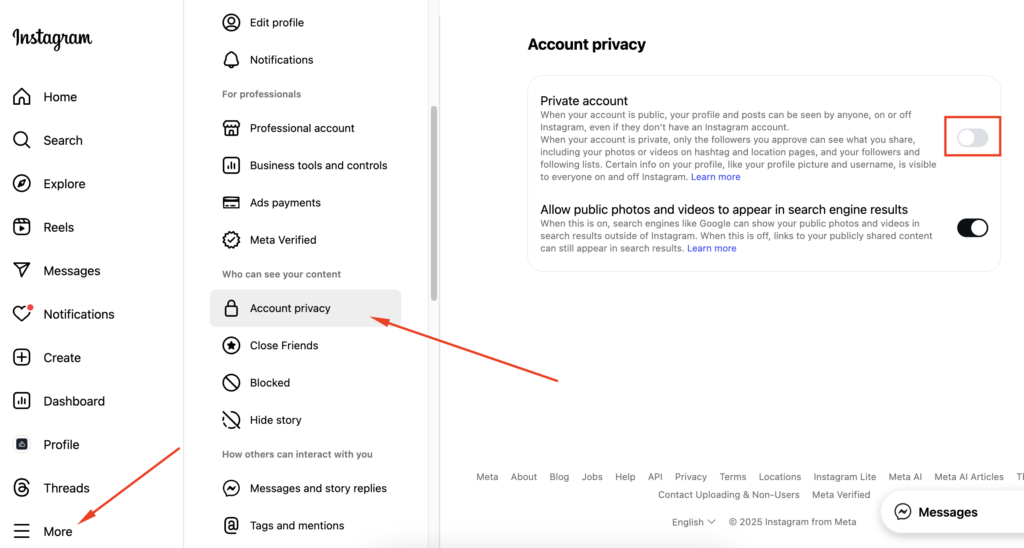
- Open the Instagram app.
- Go to your profile (bottom-right corner).
- Tap the menu icon (☰) in the top-right corner.
- Select Settings and Privacy.
- Under Account Privacy, toggle on Private Account.
✅ Pros:
- Hides followers’ list from non-followers.
- Puts you in control of approvals.
- Quick to set up.
❌ Cons:
- Approved followers still see your followers list.
- Not available for business/creator accounts.
💡 Example: If you’re a private individual and don’t want coworkers or acquaintances snooping, making your account private ensures only approved friends and family see your connections.
Method 2: Remove Followers
Personal Account: ✅ Available
Business/Creator Account: ✅ Available
Already approved someone you regret? No problem: you can remove them without any drama.
Steps to remove an Instagram follower:
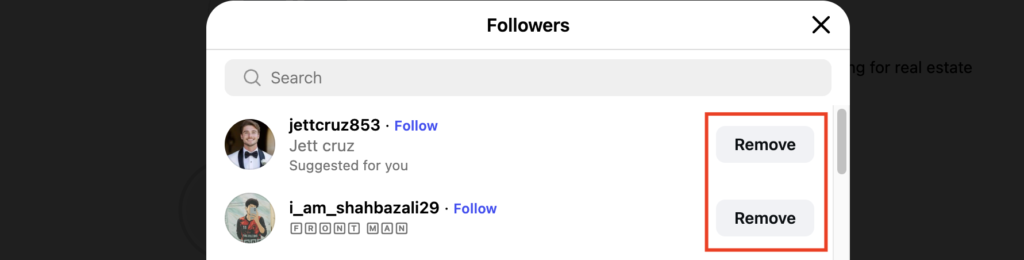
- Open your profile.
- Tap Followers.
- Find the user you want to remove.
- Tap Remove (next to their name).
The person won’t be notified, but if your account is private, they’ll instantly lose access to your posts, Stories, and followers list.
✅ Pros:
- Easy way to clean up your audience.
- No notification sent.
- Great for maintaining a safe, curated community.
❌ Cons:
- On public accounts, they can still view your profile unless blocked.
- Requires manual maintenance if you have many unwanted followers.
💡 Pro Tip: Review your followers list every few months. Think of it like decluttering your digital space.
Method 3: Block Users
Personal Account: ✅ Available
Business/Creator Account: ✅ Available
Blocking is the nuclear option (perfect if you want to disappear completely from someone’s Instagram world).
What happens when you block someone:
- They can’t see your posts, Stories, followers, or following.
- They can’t find your profile in the search results.
- They won’t receive a notification
Steps to block an Instagram user:
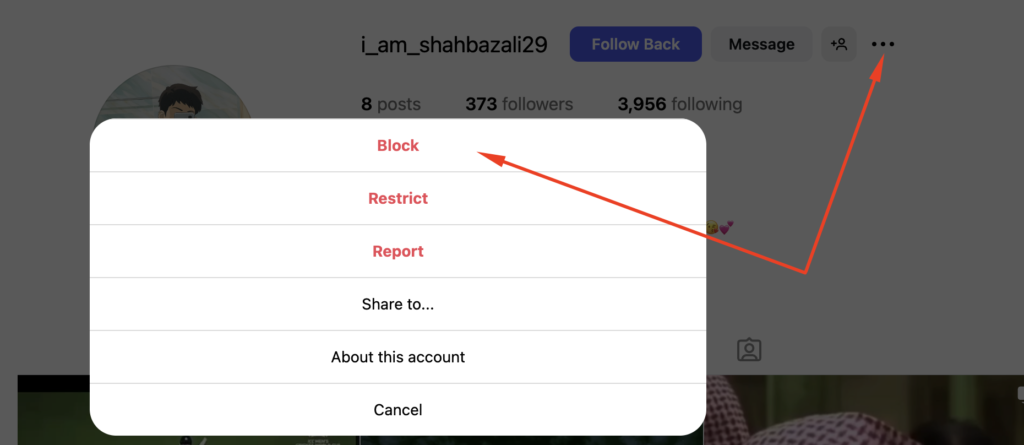
- Go to the person’s profile.
- Tap the ⋮ (three dots) in the top-right.
- Select Block.
✅ Pros:
- Maximum privacy.
- Works for both personal and business accounts.
- Immediate effect.
❌ Cons:
- More noticeable if the person tries to find you again.
- Can feel like a harsher step in social or professional contexts.
💡 Scenario: If you’re being harassed, blocking is the fastest way to cut ties.
Method 4: Restrict Accounts
Personal Account: ✅ Available
Business/Creator Account: ✅ Available
Sometimes you don’t want to block someone outright: maybe it’s a colleague, classmate, or family member. Restricting gives you a middle ground.
When you restrict someone:
- Their comments on your posts are only visible to them unless you approve.
- Their DMs go to your “Message Requests”.
- They can’t see your online activity.
How to restrict an Instagram user:
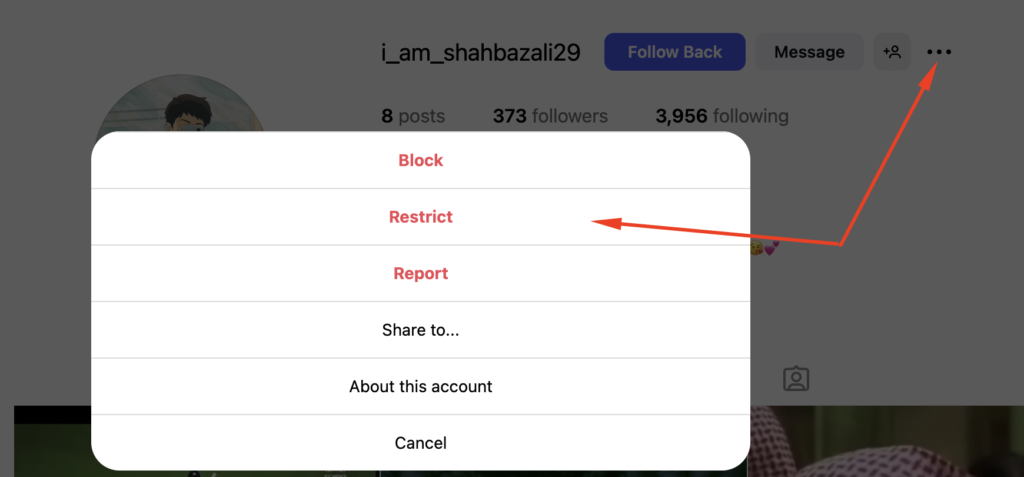
- Go to their profile.
- Tap ⋮ (three dots).
- Select Restrict.
✅ Pros:
- Discreet. They won’t know you restricted them.
- Limits visibility and interaction without cutting ties.
❌ Cons:
- Doesn’t fully hide your followers list.
- They can still view your profile if it’s public.
💡 Use сase: Ideal for people you want less interaction with but can’t block outright.
Method 5: Use Additional Privacy Features
Beyond direct follower control, Instagram offers other features that help you manage privacy:
Hide Your Activity Status
Personal Account: ✅ Available
Business/Creator Account: ✅ Available
Turn off the green dot that shows when you’re online:
- Go to Settings > Messages and story replies > Activity Status.
- Toggle off Show Activity Status.
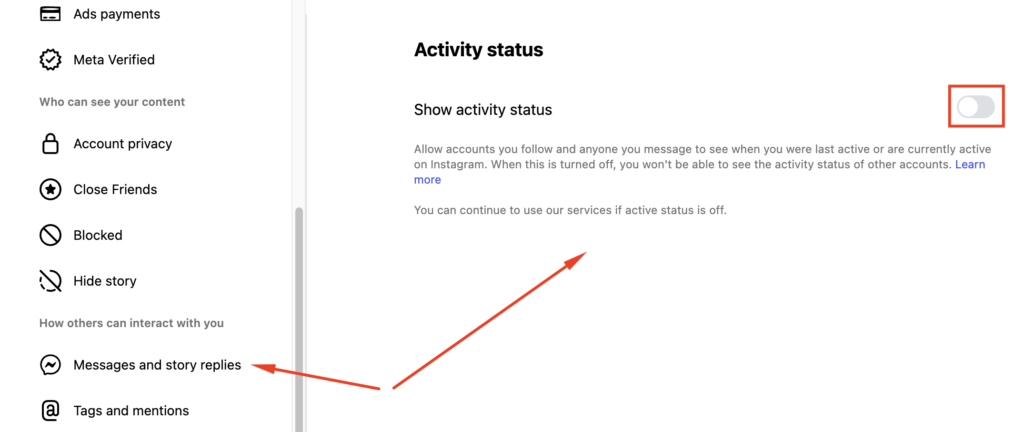
This prevents followers from tracking your activity.
Use Close Friends for Stories
Personal Account: ✅ Available
Business/Creator Account: ❌ Not available (Close Friends is tied to personal/private use)
If you only want to share Stories with a select group:
- Go to your profile > Menu (☰) > Close Friends.
- Add trusted people.
- When posting a Story, choose Close Friends.
This lets you hide content from most followers without unfollowing or blocking them.
Mute Accounts
Personal Account: ✅ Available
Business/Creator Account: ✅ Available
Muting isn’t about hiding followers, but it cleans up your feed without unfollowing
- Go to someone’s profile.
- Tap Following > Mute.
- Choose to mute their Posts, Stories, or both.
Methods for Business and Creator Accounts
Business and creator accounts don’t have the same privacy levers.
On those accounts, you can’t go private or hide your followers list. Instagram keeps these profiles public by design to keep the platform marketable.
That limits your options. But it doesn’t leave you defenceless.
Here’s what you can still do:
- Remove followers: Clean your audience manually without alerting anyone.
- Block users: The only way to fully cut visibility for specific accounts.
- Restrict users: Quietly soft-limit engagement without confrontation.
- Separate accounts: Keep a private personal profile for non-public activity.
💡 Example: If you run a small business, you might maintain a public profile for outreach and engagement, and a private account for personal use or sensitive connections.
Still, if you’re an influencer, tread carefully.
Outfy reports that brands often skip over creators with hidden follower lists, seeing them as less transparent. That can hurt your partnerships, even if your privacy intentions are legit.
💡 Key Insight: Instagram has 2–3 billion active users and over 200 million business profiles. Any shift in privacy behaviour (who follows you, who sees it, and who gets blocked) can impact your marketing reach, engagement, and analytics downstream.
Important: Stay Away from Third-Party Apps
If you’re Googling “how to hide followers on Instagram,” you’ll probably run into shady apps claiming they can do it for you. Ignore them.
Here’s why that’s a bad idea:
- They usually ask for login access, putting your account at risk.
- Instagram can detect unauthorized tools and suspend your profile.
- Most of them don’t even work (they fake “private views” or spoof stats).
So, stick to Instagram’s built-in privacy features. They’re limited, yes, but safe. And they won’t get your account flagged.
Limitations & Realities of Hiding Followers on Instagram
You can restrict visibility, but you can’t vanish.
These are the boundaries you’re working with, no matter which method you choose:
- You can’t fully hide your followers from people you’ve approved.
- Business and creator accounts will always display follower lists.
- Follower counts are public by default, even on private profiles.
- Instagram privacy = curating who gets in, not erasing what’s there.
Also, Instagram is actively cleaning house.
As SQ Magazine reported in early 2026, the platform removed over 490 million fake accounts in the previous year.
That’s great for spam control, but it also shows how exposed your list can get if you don’t stay on top of it.
Final Tips & Best Practices
There’s no perfect system to hide followers in your Instagram account. But you can build better habits to protect your space:
- Audit your followers regularly: Remove or block accounts that feel off.
- Separate business and personal: Keep private content away from public profiles.
- Balance privacy with reach: Going private reduces exposure, but boosts control.
- Check your settings often: Instagram updates features quietly. Don’t assume.
- Consider growing real followers: After cleaning out fake or inactive accounts, rebuilding with verified, engaged followers can help restore momentum, especially on business or creator profiles.
One more thing:
According to reports, public engagement rates on Instagram dropped hard in recent years, but private sharing went up. People now save, share, and DM more than they like to comment.
That’s your signal. Intimacy is the new visibility. Privacy is a strategy, not just protection.
Bottom Line: Hiding Instagram Followers Is About Controlling Visibility
You won’t find a button on Instagram that hides your follower list completely; that’s a fact.
But that doesn’t mean you’re out of options.
If you’re running a personal account, tools like removing followers, restricting access, or switching to a private account let you decide who stays in.
For business and creator profiles, it comes down to managing exposure. That means knowing when to block, when to separate accounts, and how to protect your audience without hurting performance.
Follower visibility on Instagram is layered. And now you know how to work within those layers, without taking shortcuts or risking your account.
FAQs
Can I hide my followers from everyone on Instagram?
No. Even if your account is private, people you approve can still see your followers. There’s no way to make the list 100% invisible.
Can I hide my followers and following list from specific people?
Yes. If your account is private, you can remove them. If it’s public, you’ll need to block them. That’s the only way to keep someone out of your follower view.
Will someone know if I remove them?
No. Instagram doesn’t send any alerts when you remove a follower. They’ll only notice if they try to view your content and realize they’re no longer following you.
Can I hide my following list on Instagram?
Not fully. On private accounts, only approved followers can see who you follow. On public accounts, it’s always visible. There’s no granular control for hiding specific followers.
What about business accounts?
They’re always public. That means your followers list (and who you follow) stays visible. Your only options are block, restrict, or separate accounts for private activity.