Keeping your emails fresh takes work. You want to give subscribers something worth opening, but you also have campaigns to send, deadlines to meet, and a growing list of ideas to try.
I get it. As a Head of Content, I analyze over 10,000 emails a month, and I’m always curious about what makes me stop scrolling.
Sometimes it’s a product recommendation that feels relevant. Other times, it’s a simple message that gets to the point and gives me a reason to click.
That’s a useful question to bring to email marketing trends, too: what would make your emails worth someone’s time?
With that in mind, let’s take a look at 10 email marketing trends for 2026 and how you could use them in your campaigns.
Ready to begin?
Email Marketing Trends to Consider for Your Campaigns in 2026
A useful trend should have a clear place in your email program. It might help you follow up after a purchase, put customer feedback to work, or spot a problem your campaign reports have missed.
With that in mind, here are ten trends worth a closer look, along with ways to put them into practice.
1. Interactivity in Emails
Give subscribers something useful to do in your email, and you give them a reason to spend a little more time with it. A quick poll, a product preference, or a short quiz can invite participation without turning your campaign into a production marathon.
I like GIFs for a similar reason: they can explain a lot in a small space. Show how a product folds, highlight a feature, or add a little humor. You can put one together with tools like Adobe Photoshop or Canva without booking a shoot.
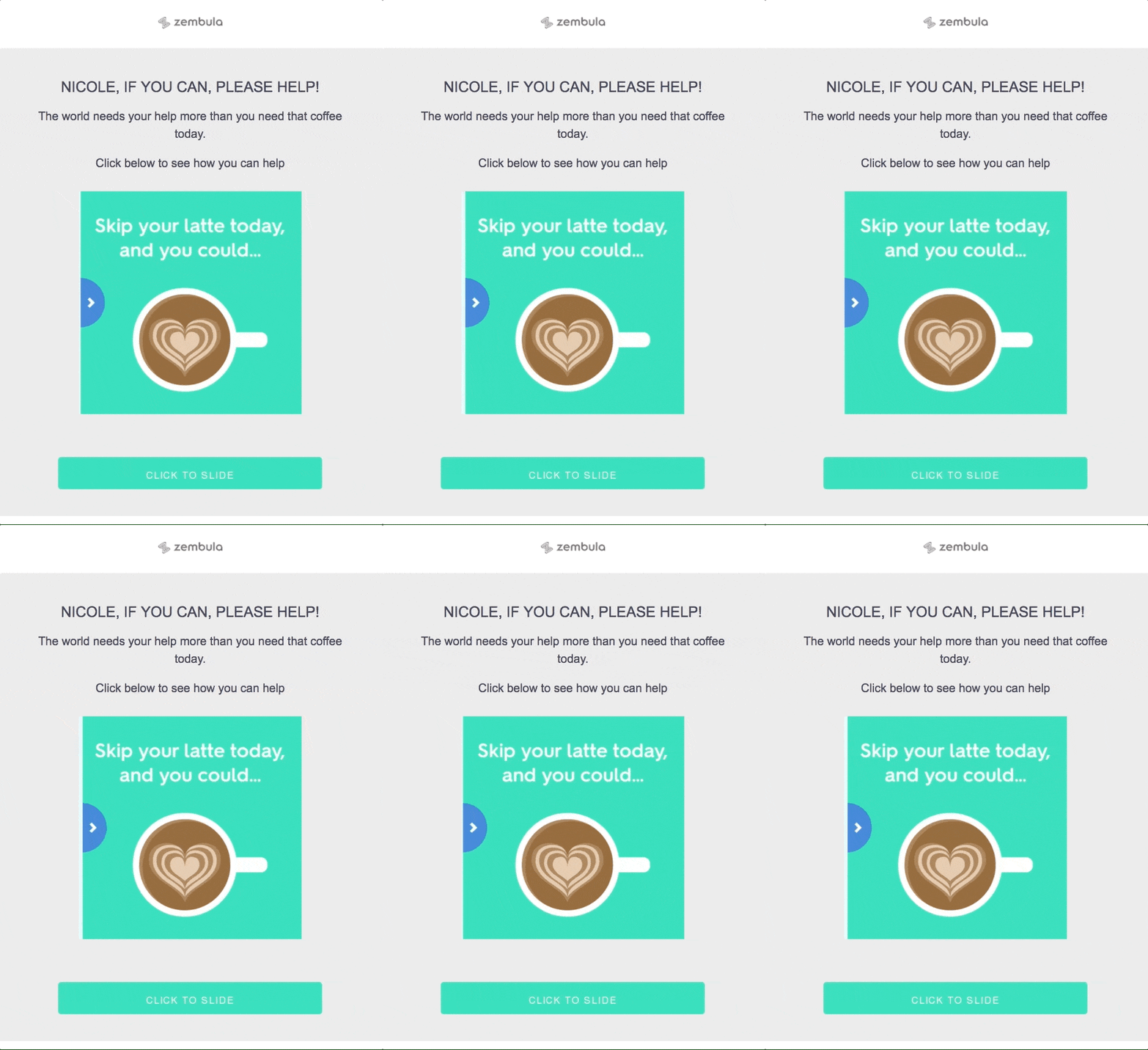
A GIF adds movement, though it doesn’t make the email interactive on its own. Videos give you room for a fuller story, such as a product demo or a customer explaining how they use what you sell.
Also, email remains a popular way to share those videos. Per Wistia’s 2026 State of Video Report, 48% of surveyed companies use email to distribute their videos, behind social media (83%) and landing pages (65%).
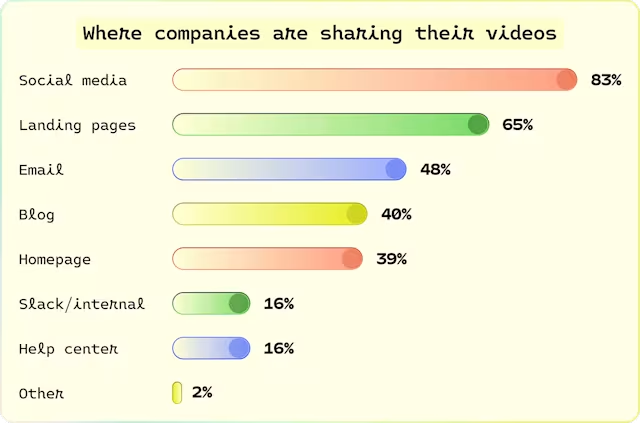
Source: Wistia’s 2026 State of Video Report
The format you choose should earn its place. Here are a few ways to use it:
- Show the detail people ask about. A short GIF can demonstrate how a bag closes or how an attachment fits.
- Put an existing video back to work. Link a thumbnail to a useful demo or testimonial you already have.
- Ask a question you can act on. Let subscribers select a product category, then use that preference to send more relevant offers.
Keep it easy to follow. If someone needs instructions to figure out your email, you may have given them too much homework.
Before you send, test how everything displays and include a fallback link for interactive features. A subscriber should still have an easy way to participate when their inbox won’t cooperate.

2. Personalization and Segmentation
“Hey [Your Name]” is a friendly opening. But if the next line promotes something you’ve already bought, the personal touch wears off pretty quickly.
Segmentation helps you group subscribers around purchase history, preferences, or where they are in the customer journey. Personalization puts those details to work in the message, offer, or follow-up.

An online retailer might recommend sports gear after you browse its athletic wear section. A returning customer could get accessories for a product they already own. You’re giving each person a reason to care about the email.
There’s a spending angle here, too.
During Black Friday/Cyber Monday 2025, emails that combined segmentation with personalized dynamic content recorded an 11% higher average order value than those without them, according to Mailchimp’s insights. Customers spent more per order in that comparison.
Spotify’s end-of-year “Wrapped” campaign takes personalization further with a recap of each listener’s habits. It’s a memorable example, but you don’t need a Spotify-sized production to make your emails feel relevant.
For a small team, a few useful groups are a good place to begin:
- New subscribers. Introduce your products and answer the questions someone might have before buying.
- First-time buyers. Help them get more from their purchase with setup advice or product care tips.
- Returning customers. Recommend relevant additions and exclude items they’ve recently bought.
- Subscribers with stated preferences. Send offers or content about the categories they selected.
I’d get those groups working well before adding more. Each segment needs a clear purpose, dependable data, and enough content to keep it useful. Twenty groups won’t help much if your team can only maintain four.
For more tips on subject lines and message clarity, check out how to get your emails opened and read. Once someone opens the message, though, the offer still has to earn the click.
As you personalize your email marketing campaigns, check the details before you send. A timely recommendation feels helpful. A reminder for something that arrived yesterday feels like you weren’t paying attention.
3. The Role of AI and Automation
AI and automation can take some recurring work off your plate, from drafting an email to sending a follow-up after a purchase. For a small team, that leaves more time to work on the offer, check performance, and plan the next campaign.
The two serve different purposes. AI can suggest copy, product recommendations, or audience groups based on the data available. Automation follows the triggers and rules you set, such as sending a welcome email when someone subscribes.
I’d begin with a task that keeps eating into your week. If writing holds up every campaign, use AI to draft a few versions from a clear brief. Give it the product details, audience, and offer, then edit the output so it sounds like you. “Write a promotional email” leaves far too much room for bland copy.
If follow-ups keep slipping through the cracks, build an automated sequence around a specific moment. A first purchase could trigger product care advice. A new subscriber could receive an introduction to your range. Check when each sequence should stop, too, so customers don’t keep receiving reminders after taking action.
For businesses looking for the best Mailchimp alternative, those everyday tasks provide useful criteria for comparing platforms. Check which triggers, integrations, and editing controls support your workflow before getting distracted by a long feature list.
Tools also differ in the work they support. Mailgo, for example, combines AI email writing with lead-finding features for outreach. That serves a different need from managing campaigns for existing subscribers, so keep the distinction clear as you compare options.

Top AI email assistants can help you assess other uses, such as drafting replies or organizing messages. Choose the help your team needs, rather than adding another tool someone has to manage.
Scheduling deserves a look as well. If your platform offers send-time optimization, test it against your current schedule and compare the actions you care about, such as purchases or registrations. Treat the suggested timing as something to evaluate.
Also, keep a human review before launch. Check product claims, prices, links, and the sender details in your email signature. Saving time on production feels good. Spending that time fixing an avoidable mistake feels considerably less good.

4. Compliance and Privacy Concerns
Building an email list starts with being clear about what people are signing up for. Tell subscribers what you’ll send and how frequently they can expect to hear from you. Nobody enjoys signing up for product updates and getting a daily sales pitch.
From there, make sure your campaigns respect those expectations. If someone asks to leave, give them an easy way out and check that your automated sequences respect the unsubscribe, too.

And be careful if you buy email lists. A provider’s claim that contacts are permission-based doesn’t establish that those people agreed to receive your campaigns. Before using purchased contacts, check how the data was collected, what the permission covers, and what your email platform allows.
On the technical side, review your DMARC policy options to help protect your domain against spoofing. Authentication and consent serve different purposes: your messages need a trustworthy sender identity, and your use of subscriber data needs its own checks.
Alongside that, monitor your sender reputation and email deliverability. If your messages struggle to reach subscribers, catch the problem before adding more campaigns to the calendar.
Finally, keep your consent records organized and review your practices regularly. You should be able to explain where a contact came from and what they signed up to receive without digging through six spreadsheets.
For a small team, keeping those details in one place makes that review much easier.
5. Importance of Mobile Optimization
Your email should be easy to read and use on a phone. If subscribers have to zoom in to read the offer or tap a link three times, you’re asking them to work too hard.
To get the layout right, start with responsive design. It helps your emails adjust to phones, tablets, and desktops, so the message stays readable across screen sizes.
Then, check the details your subscribers will interact with:
- Readable text. Keep the offer and essential details clear without zooming.
- Easy-to-tap buttons. Leave enough space around links so someone can select the one they want.
- Focused content. Put the main message and CTA where readers can find them without a long scroll.
I’d also send myself a test and open it on my phone. A layout can look perfectly fine in the editor and feel awkward once you’re holding it in one hand.

And keep checking after the click. Klaviyo identified friction in mobile forms as a recurring problem, including too many fields, awkward layouts, and steps that are difficult to complete on a phone.
So, if your email leads to a signup form or checkout, walk through that experience on mobile, too. Ask only for the information you need at that stage and check that each step is easy to complete.
Your email has done its job when someone clicks; don’t let a frustrating form waste that effort.
6. The Shift Away from Traditional Metrics
A high open rate looks good in your report. But did anyone buy, register, or take the next step?
That’s the question I’d want answered before calling a campaign a success.
The catch is that an open report can’t always tell you who read the email. Privacy features can affect how those opens get recorded. Apple’s Mail Privacy Protection is one example: for subscribers who use it, an email can register as opened without them reading it.
Your whole list doesn’t need to use Apple for that to complicate the picture. Keep opens as a supporting signal, then check what subscribers did next.
From there, connect your reporting to the job you gave the email. A product promotion and an onboarding message have different goals, so they shouldn’t get the same scorecard.

For a small team, a focused set of metrics makes the review easier:
- Email deliverability. Check if your messages reach subscribers’ inboxes. A successful delivery doesn’t necessarily mean the email avoided the spam folder.
- Open rate. Use recorded opens as a supporting signal. Privacy features can register an open without someone reading the message.
- Click-through rate (CTR). Track the percentage of delivered emails that generate a click. Check which links get attention, too.
- Click-to-open rate (CTOR). Compare unique clicks with unique opens, but remember that unreliable open tracking can distort this figure.
- Bounce rate. Monitor messages that couldn’t be delivered. Review hard and soft bounces to identify invalid addresses or temporary delivery problems.
Then, look at those numbers together. Plenty of clicks with few purchases gives you a reason to check the offer, landing page, or checkout. A rise in unsubscribes after several promotions calls for a closer look at frequency and relevance.
Also, keep results from other channels separate. If you use direct mail marketing alongside email, label each channel clearly so your report shows which activity contributed to the response.
You don’t need a dashboard full of numbers to make a useful decision. Pick the measures that connect to your campaign’s goal, compare similar sends, and use what you find to plan the next test.
7. Innovative Email Designs
Good email design helps readers spot the offer, understand it, and find the next step. You can still have bold colors and plenty of personality. Just give everything a clear place in the message.
I like visuals that do some of the explaining. A product close-up can highlight a detail, while typography and spacing can make the main benefit easy to spot. If every element competes for attention, your reader has to decide what deserves a look.

Before adding anything new, check the order of the content. Does the headline introduce the offer? Does the image support it? Is the CTA easy to find? Those choices give your design direction, even with a simple layout.
Also, don’t feel pressured to make every email interactive. According to a DesignRush survey, 45% of respondents said they rarely used interactive elements in their emails, and 21% said they never used them. That puts the trend in perspective: interactive formats are far from universal.
For a small team, reusable layouts also make room for creativity without rebuilding each campaign. You could keep a product launch template, a customer story layout, and a simpler format for quick updates. Change the content and visuals to suit the message.
Platforms such as Flodesk bring email design tools into the campaign workflow, which can help you work on the layout as you prepare the send. Still, preview and test your emails across inboxes. A design that looks polished in the editor needs to hold up when it reaches your subscribers.
Finally, give each addition a reason to stay. If an image explains the product or a heading makes the offer clearer, keep it. If it only makes the email longer, your reader probably won’t miss it.
8. Leveraging User-Generated Content
Customer photos, reviews, and testimonials give subscribers a look at your product in someone else’s hands.
That can help answer the questions your polished product shots leave open: how does it fit, how does it hold up, and what’s it like to use?

For example, a fashion brand might feature customer photos wearing its latest collection. A tech company could include a testimonial in a product launch email that explains how a customer uses a particular feature.
I’d choose the content around a question your customers ask. “Love it” is nice to hear, but a review explaining that a jacket fits comfortably over a sweater gives someone more to work with.
You probably have a few places to look already:
- Product reviews. Pick comments that explain a specific benefit or address a buying concern.
- Tagged customer photos. Show the product in everyday settings, with permission from the person who created the image.
- Customer feedback. Ask if you can turn a useful comment from an email or support conversation into a testimonial.
From there, give the content enough context to make sense. Identify the product, keep the customer’s meaning intact, and explain any detail the reader needs. A photo of someone wearing your shoes becomes more useful when subscribers know which pair they’re looking at.
Also, get permission before reusing customer content in your campaigns. A public post or a brand tag shouldn’t be treated as automatic approval for email use.
For a small team, one relevant photo or a short review can be enough. Put it close to the product or offer it supports, so readers can connect the customer’s experience with their own buying decision.
9. Gamification
A quiz, challenge, or reward can give subscribers a reason to participate in your campaign. The trick is choosing an activity they’ll enjoy and giving it a clear connection to your product or message.
For example, a short product quiz could help someone narrow down your range. A challenge might invite customers to try a feature and share their experience. Points and rewards can also support a loyalty program, provided the rules are easy to follow.

I’d keep the first version small. Your team needs time to build it, test it, and manage the follow-up. A quick quiz with a useful recommendation at the end gives you a manageable place to begin.
Stripo offers an example from an educational email sequence. It added a six-question quiz to the final email and reported that, between November 2025 and June 2026, CTOR rose from 1.6% during the first six months to 3% during the final two.
That’s one campaign example, but it shows how a quiz can give readers a way to check what they’ve picked up.
For your own campaign, decide what happens after someone participates. A preference quiz should lead to relevant suggestions. An onboarding challenge should help customers use the product. If you offer a discount or early access, explain what they need to do and what they’ll receive.
And keep the effort reasonable. A subscriber may happily answer a few questions to find a suitable product. A complicated treasure hunt for a small discount could test their patience.
Finally, measure participation alongside the next action you wanted. Quiz completions can tell you people took part; purchases or product use help you assess if the activity served its purpose.
10. Sustainability in Email Marketing
Sending fewer unnecessary emails and keeping files lean gives you a practical place to start with sustainability. For a small team, those habits also help keep the campaign calendar and subscriber list manageable.
First, review your sending frequency. Does each email have a useful reason to arrive, or are you filling a slot on the calendar? Give subscribers control over how frequently they hear from you, and check for overlapping automated messages.
Next, keep your list in good shape. An email verifier can help identify invalid addresses. Review inactive subscribers separately, using clicks, purchases, and other activity rather than open rates alone.
Then, check the weight of your content. Compress images and remove visuals that don’t help explain the message. I’d keep a useful product photo and cut the decorative extras before stripping every email down to plain text.
These changes give you concrete work to do without promising a specific reduction in emissions. If you discuss environmental benefits in your campaigns, support those claims with evidence. A cleaner email program is a sensible goal; attaching a planet-saving promise to it needs more backing.
Which Email Marketing Trends Should You Prioritize?
With ten trends on the table, you probably have a few ideas for your next campaign. Before adding them all to your calendar, take a look at what needs attention in the emails you already send.
If customers keep receiving offers for products they own, segmentation is worth a look. If people click but struggle to finish a form on their phones, check the mobile experience first.
I’d choose one problem to work on. You’ll have a clear reason for the change and an easier time seeing if it helped.
To narrow down your options, check these four things:
- The problem you want to solve. Look at your campaign reports, customer feedback, or the steps someone takes to buy. Find a specific issue you can address.
- What you have to work with. Check your customer data and email platform before planning the change. Product recommendations, for example, need accurate purchase information.
- Your team’s available time. Allow time to set things up, test them, and keep them working. A quiz still needs someone to review the answers and handle the follow-up.
- What success would look like. Choose an action you want more people to complete, such as a purchase or registration. Decide how you’ll track it before sending.
Then, keep your first test small. Add a customer review to one product email or improve one post-purchase sequence. If you change the offer, design, timing, and audience together, it becomes harder to tell what helped.
After you review the outcome, decide what to try again and what deserves a place in your regular campaigns. You can build from there without giving your team ten new jobs at once.
When Does Your Email Marketing Plan Need Outside Help?
Once you’ve chosen what to work on, check if your team has the time and skills to carry it through. A focused campaign test may fit comfortably into your week. Connecting customer data, rebuilding several automated sequences, or fixing persistent delivery problems can require more support.
You might consider outside help if:
- Campaign work keeps getting pushed back. Your team can manage regular sends, but improvements stay on the to-do list.
- The setup goes beyond your team’s skills. Data connections or overlapping automated sequences need work nobody feels confident handling.
- Problems keep returning. You’ve tried to address delivery issues or weak campaign performance, but you still can’t identify the cause.
Before speaking with an agency, write down the problem, your email platform, and what you want to improve. You may need a specific project completed rather than someone to take over the whole program.
Then, ask potential partners for an example of similar work. Have them explain what they changed, how they measured the outcome, and what your team would need to contribute. I’d want those details before being impressed by a polished presentation.
That same focus should guide where you look for help: an agency’s visibility tells you little about its fit for your project. GrowthFolks, for instance, uses your brief to match agencies and ranks them on fit and a success rate built from deals both sides confirm closed.
Paid placement can’t raise an agency’s position, so you can use those matches as a starting point for the conversations above.
Ready to Choose Your Next Email Marketing Move?
You’ve got plenty of ideas to work with. Now give one of them a clear job in your next campaign, leave time to test it, and check what subscribers do after the send.
I’d rather see one useful improvement become part of your routine than ten ambitious ideas sit untouched on your calendar. So, keep what helps, adjust what falls short, and give your team room to build on the progress.
Your subscribers have limited time, too. Make the next email worth theirs.
Frequently Asked Questions
What is the future of email marketing?
Email marketing is heading toward messages that better reflect what customers want and when they need it. For your business, that could mean helpful advice after a purchase or offers based on someone’s interests.
Start with what you know about your subscribers and give each email a reason to arrive.
What is the next big thing in email marketing?
AI is getting plenty of attention because it can help with time-consuming work, such as drafting emails and creating different versions to test. If your team is stretched, pick one task to try it on. You’ll still need to check the facts, polish the wording, and make sure the message sounds like your business.
What are some emerging trends in email design for 2026?
Short surveys, simple layouts, and designs that work well on phones and in dark mode are worth a look. But get the basics right first: readable text, helpful images, and an easy-to-find button. Open a test email on your phone and see how comfortable it feels to read and use.
What is the best day for email marketing in 2026?
The best day depends on your audience, so test a few options with similar emails. Look at clicks and completed purchases or signups, then compare the results across several sends. One great Tuesday doesn’t mean every Tuesday will work.
What metrics should be tracked to measure email marketing success?
Check how many people clicked and how many completed the action you asked for, such as buying a product or signing up. Also watch for emails that couldn’t be delivered, people leaving your list, and spam complaints. Open rates can add context, but a recorded open doesn’t always mean someone read the email.
How can businesses improve email deliverability?
Send emails people agreed to receive, remove invalid addresses, and make it easy to unsubscribe. Also check that your sending domain is set up to help inbox providers recognize your emails.
If more messages start bouncing or getting marked as spam, investigate before sending more.
What are some best practices for segmenting email lists?
Start with a few groups that need different messages, such as new subscribers, first-time buyers, and returning customers. Use what they’ve bought or told you they like to choose relevant content.
Keep those details up to date, so you don’t recommend something that arrived on their doorstep yesterday.