
Consumers now watch an average of 17 hours of online video per week. That number alone should tell you something about where attention has gone and where marketing budgets need to follow. But publishing videos is not the same as running a video strategy. Plenty of businesses produce content regularly and see little return because the execution is reactive rather than planned.
The gap between brands that get results from video and those that don’t usually comes down to a handful of decisions made before the camera rolls. According to Wyzowl’s 2025 State of Video Marketing report, 93% of marketers say video has delivered a good ROI, but that figure tells you what’s possible, not what’s automatic. Getting there requires more than a production schedule.
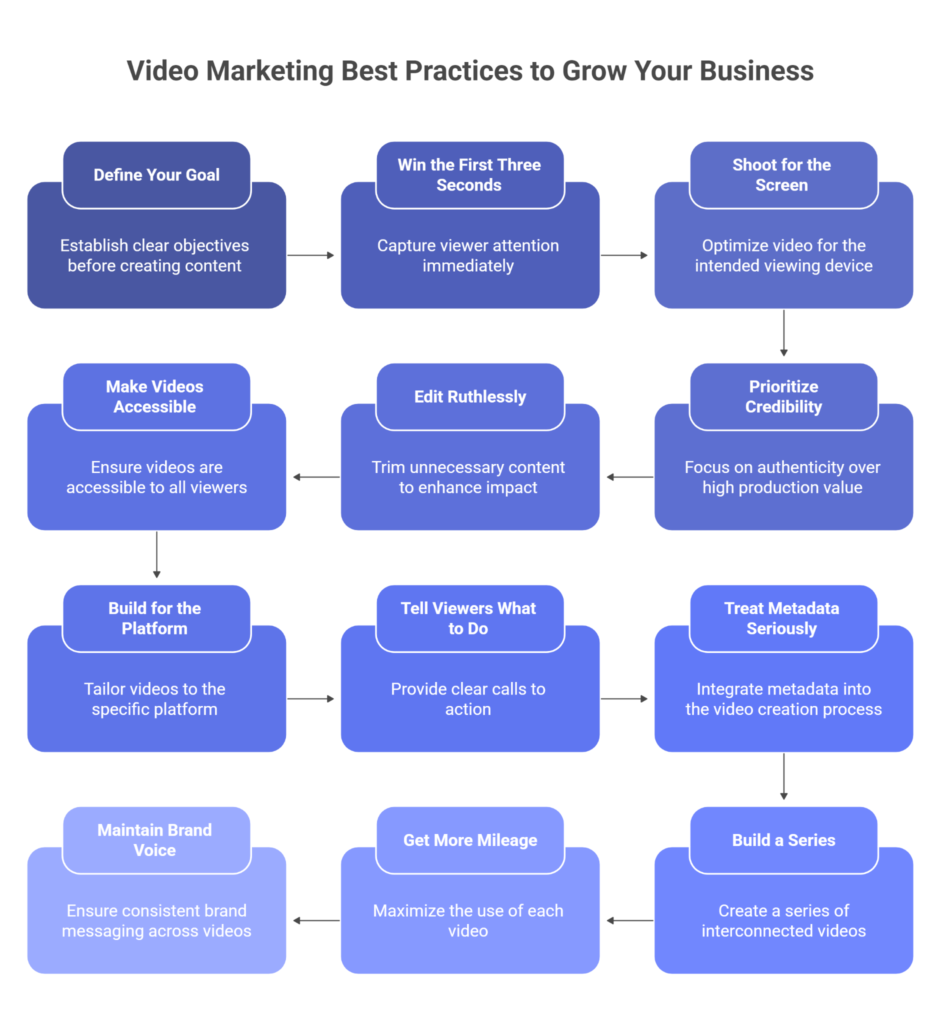
This guide walks through 12 practices that separate video content that builds business from video content that fills a calendar.
12 Video Marketing Best Practices for Business Growth
1. Define Your Goal Before You Write the Brief
The most common reason a video underperforms is that nobody agreed on what “good” looked like before production started. Views are not a goal. Neither is “brand awareness” without a measurable definition attached.
Before anything else, answer one question: what should a viewer do, think, or believe differently after watching this video? That answer shapes the script, the length, the platform, and the CTA. Without it, you’re making creative decisions by feel.
Common, well-defined video goals include:
- Drive signups to a free trial from a specific landing page
- Reduce inbound support tickets by explaining a feature that customers frequently misuse
- Generate qualified leads for a specific job title on LinkedIn
- Improve purchase confidence on a product page by showing the item in use
Your goal also tells you where in the buying process the video belongs. A video meant to introduce your brand to new audiences needs a different tone, length, and CTA than one targeting someone who already has your product in their cart. Conflating the two is how brands produce videos that feel unfocused even when the production is solid.
2. Win the First Three Seconds or Lose the Viewer
Every major video platform uses the early drop-off rate as a signal. If viewers click away in the first few seconds, the algorithm interprets that as weak content and stops recommending it. Your opening is, therefore, not just a creative choice; it directly affects how many people the platform shows the video to.
What works in the opening:
- Get to the point, immediately state what the viewer will get out of watching
- Skip the logo animation and the “hi, welcome to our channel” intro
- Open with something that creates a reason to keep watching: a surprising claim, a direct question, or a specific problem the viewer recognizes
- Make sure the first visual frame stops someone mid-scroll
Think of the first three seconds as a contract with the viewer: here’s what you’ll get if you stay. Break that contract, and they’re gone. If you’re running paid video, test two or three different openings on a small budget before scaling the one that holds attention longest.
3. Shoot for the Screen Your Audience Actually Uses

More than 75% of video views happen on mobile devices, according to Marketing Dive. Most video teams know this. Fewer actually build for it from the start, instead resizing or cropping horizontal footage after the fact and wondering why it underperforms.
Mobile-first production is not a format tweak; it changes how you shoot:
- Use vertical (9:16) or square (1:1) formats for social platforms; horizontal footage feels like a mistake on a phone
- Frame the subject centrally so nothing important sits in a corner that gets cropped
- Make text overlays large enough to read on a 5-inch screen without zooming
- Design for mute captions and on-screen text should carry the message without audio
- Review the final cut on a physical phone, not just a desktop preview window
A video that looks polished on your monitor can be genuinely hard to follow on the device where most of your audience is watching. The time to catch that is before you publish, not after you’ve checked the analytics.
4. Stop Chasing Production Value at the Expense of Credibility
Expensive production does not make a video believable. It makes it expensive. Viewers have become good at recognizing and dismissing the visual language of corporate video: the smiling stock-footage team, the buzzword-heavy script, the spokesperson who clearly memorized their lines that morning.
What actually holds attention is a real person who knows what they’re talking about. A product manager walking through a feature in a Zoom recording, or a customer describing a specific problem your product solved, will outperform a polished brand film if the content is genuinely useful.
That said, there are three things poor quality cannot overcome:
- Bad audio echo, background noise, or wind immediately signals amateur content and causes viewers to drop off
- Shaky footage, even a cheap tripod, fixes this
- Flat or unflattering lighting, a ring light, or a window is usually enough
Beyond those fundamentals, match the production level to the context. Raw footage works for behind-the-scenes content because the format earns it. A product demo shown to someone making a purchase decision warrants more care. The mistake is using one approach for everything, regardless of what the video is trying to do.
5. Cut Until It’s Done, Then Cut Again
Most first drafts of a video are too long. Most second drafts are also too long. The instinct to include everything, every caveat, every example, every transition phrase, produces videos that respect no one’s time, including the viewer’s.
Length should follow the format and the content, not a template:
- Social clips: 30 seconds to 2 minutes
- Tutorials and product walkthroughs: 5 to 10 minutes, with timestamps or chapters
- Webinars and interviews: longer formats work, but only if the editing is tight
In the edit, remove anything that isn’t directly moving the viewer toward the goal you defined in step one. Filler phrases, long pauses, repeated points, tangents that felt important in the moment, cut them. Viewers don’t miss what they never see. They do notice when a video makes them wait for a payoff that doesn’t come.
6. Make Your Videos Accessible Not as a Courtesy, but as a Requirement

Captions, transcripts, and audio descriptions are not optional extras. They are the difference between content that works for everyone and content that quietly excludes a significant portion of your audience.
Adding captions alone increases average video view time by 12%, simply because many viewers watch without sound on public transport, in open offices, or in situations where playing audio would be disruptive. Captions serve those viewers. Transcripts serve non-native speakers and people who prefer reading. Audio descriptions serve visually impaired audiences.
The accessibility baseline every video should meet:
- Accurate captions for all spoken content, auto-generated captions save time, but need human review; errors undermine credibility
- Audio descriptions for any content where the visuals carry meaning that isn’t captured in the dialogue
- A published transcript, which search engines can index, and which helps viewers who want to skim or reference specific points
There is also a legal dimension. ADA and WCAG compliance requirements apply to video content, and the exposure for businesses that ignore them is real. Teams that don’t have in-house captioning capabilities can use professional video accessibility services like those offered by Continual Engine to handle captioning, audio description, and transcript generation without pulling production resources away from filming.
7. Build Each Video for the Platform It Will Live On
Posting the same video to every platform is not a distribution strategy. Each channel has a different audience, a different viewing context, and a different set of expectations. Content that performs on YouTube will often feel out of place on TikTok, and vice versa, and both platforms’ algorithms will tell you so through suppressed reach.
A rough guide to platform expectations:
- LinkedIn: Professional tone, substantive content, value front-loaded in the first 30 seconds. Viewers are there to learn something, not to be entertained.
- Instagram and TikTok: Fast pace, trend-aware, with sound and music doing real work. The hook needs to land in the first second, not the third.
- YouTube: Longer formats are viable here because viewers actively search for what they want. Strong titles, custom thumbnails, and chapter markers make a significant difference.
- Website and landing pages: Short, benefit-led, and designed to autoplay muted. Testimonials and product demos tend to work better here than brand storytelling.
Where possible, upload natively to each platform rather than sharing a link. Algorithms on every major platform prefer content that keeps users on-site, and native uploads get more favorable distribution as a result.
8. Tell Viewers Exactly What to Do Next
A video without a clear next step is a missed opportunity. It doesn’t matter how well the content is performed if the viewer finishes watching and has no obvious action to take.
The CTA needs to be specific, not aspirational. “Learn more” is not a CTA. “Download the free checklist at the link below.” The more precisely you describe what you want the viewer to do and the fewer steps it takes to do it, the more of them will follow through.
A few things that consistently reduce CTA effectiveness:
- Asking for more than one action in the same video, viewers who are told to subscribe, share, and visit the website typically do none of the above
- Burying the CTA at the very end with no earlier reference to it
- Sending viewers to a landing page that doesn’t match the promise the video made
- Using platform features poorly, YouTube cards, Instagram link stickers, and LinkedIn’s native buttons all reduce friction; skipping them and asking viewers to “check the bio” adds it back
9. Treat Metadata as Part of the Video, Not an Afterthought
Well-produced video with poor metadata will be outranked by an average video with good metadata. Search engines and platform algorithms both use titles, descriptions, tags, and transcripts to determine what a video is about and who to show it to. That work happens before a single person clicks play.
What good video metadata looks like:
- Title: describes what the video actually covers, includes the term someone would search for, and reads like something a person wrote
- Description: The first 150 characters do the heaviest lifting because that’s what appears in search previews. Put the topic and key benefit there, not a generic intro
- Tags: use specific, relevant terms; broad tags add no value, and keyword stuffing can actively hurt distribution
- Thumbnail: custom-designed, visually distinct from competing videos in the same search results, and accurate about what the video contains
- Transcript: publish the full text; search engines index it, and it creates an additional entry point for organic traffic
One note on thumbnails: misleading ones produce short-term clicks and long-term problems. High early drop-off rates tell the algorithm that viewers felt misled, and it responds by showing the video to fewer people.
10. Build a Series, Not a Library of One-Offs
A single strong video can perform well. A consistent series builds an audience. The difference is that a series trains viewers to come back; they know what to expect, they know when to expect it, and over time, they start seeking it out rather than stumbling across it.
What makes a series work in practice:
- A format that stays consistent across episodes: same intro treatment, same structure, same visual style
- A predictable publishing schedule, even if it’s only monthly regularity, matters more than frequency
- A tight scope, a series about one specific topic, builds authority faster than one that covers anything adjacent to your industry
- Clear naming that lets a new viewer understand what the series is about and find previous episodes
Series also have an internal benefit worth noting. When someone on the team questions whether a video is worth producing, “it’s part of our ongoing series for this audience segment” is a cleaner answer than “we think it would be useful.” A defined series makes content decisions easier to defend and easier to plan.
11. Get More Mileage Out of Every Video You Produce
Most teams treat a published video as finished. It isn’t. A single piece of long-form video contains enough material to fuel a week or more of content across other channels if you’re systematic about extracting it.
What one long-form video can reasonably become:
- Three to five short clips pulled from the highest-value moments, formatted for social platforms
- A written article built from the transcript, lightly edited for readability
- An infographic from any data or frameworks mentioned
- A podcast episode from the audio track alone
- Email content built around a key quote or insight from the video
- Slides or training material for internal use
The point is not to flood every channel with the same content in different shapes. It’s to recognize that production is expensive and distribution is not, and to get proportional value from the effort that went into filming. Different people consume content differently; repurposing lets you reach all of them from the same source material.
12. Keep Your Brand Voice Consistent Across Every Video
The fastest way to make video content forgettable is to make it sound like it could have come from any company in your category. Viewers do not remember content that could have been made by anyone; they remember content that sounds like it could only have come from you.
Brand voice in video is not just about tone; it includes who speaks, what they talk about, how ideas are framed, and what the company chooses not to say. A brand that is known for being direct should be direct on video. One known for warmth should feel warm, not corporate. Those qualities need to hold whether the video is a product demo, a customer story, or a quick social clip.
Some things that help maintain that consistency:
- Put real people from the company on camera, employees and actual customers carry more credibility than hired spokespeople
- Give subject matter experts room to speak in their own voice rather than reading from a script written by someone who doesn’t know the topic
- Develop a basic style guide for video that covers tone, what’s in and out of scope, and how the brand should never sound
- Review new videos against older ones before publishing. Does this feel like it’s from the same company?
Consistency compounds. Every video that sounds and feels like your brand makes the next one more recognizable. Every video that doesn’t dilute the work that came before it.
Conclusion
The businesses that get real results from video are not necessarily the ones with the biggest production budgets. They’re the deliberate ones: they know what each video is supposed to do before they film it, they build for the platforms their audience uses, and they show up consistently over time. Businesses using video grow revenue 49% faster than those that don’t, but that gap comes from strategy, not just from having a camera.
Pick two or three sections from this guide that address the weakest part of your current approach. If your videos aren’t being found, the metadata and SEO section is where to start. If they’re being found but not converting, look at your CTAs and your objective-setting process. If production is bottlenecking everything, the repurposing and series sections will help you get more from what you’re already making.
Video rewards the teams that treat it as a discipline rather than a deliverable. The practices above are where that discipline starts.